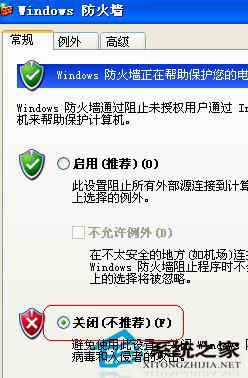
WinXP 瀏覽網頁時防火牆頻繁彈出「阻擋/下載」提示,干擾操作。可透過以下兩種方法正確關閉防火牆:
關閉防火牆後不再彈出干擾提示,但請注意系統安全風險,建議改用第三方防火牆或調整規則而非完全關閉。
Windows 8/8.1 免重裝啟用 AHCI 模式 登錄與 BIOS 設定
Win7 如何設定 Proxy 代理伺服器?Internet 選項 → 區域網路設定 → 進階代理設定圖文教學
Win10創建透明文件夾隱私保護術:圖標透明化+命名隱身雙重偽裝
Windows 7 任務列變透明:開啟 Aero 效果選擇主題即可實現
升級 Windows 10 常見問題彙總:無限重開機、藍屏、無法上網解決方案
進入 Windows 8 安全模式的兩種方法
Windows 8.1 系統重裝完整教程:善用內建恢復功能輕鬆還原
Win7 IE 瀏覽器開網頁緩慢?六大排查方向與解決方案