WinXP 存取管理員桌面路徑提示「配額不足,無法處理此命令」。解決方法:透過群組原則禁用磁碟配額。
gpedit.msc 開啟群組原則。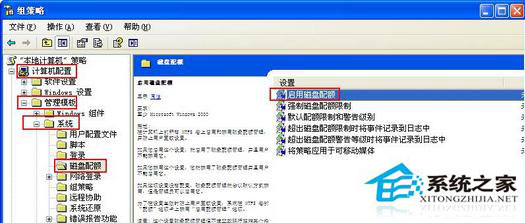
四步驟即可解決配額不足導致的存取拒絕問題。
中國定制版 Windows 10 應用商店系統介面曝光 內建微軟服務鎖定首頁搜尋引擎
Win8 應用商店搜尋功能在哪?Win+C / Win+F 兩種喚出法
微軟加速更新節奏:Win10 技術預覽版將改為每月推送 1-2 次更新
Windows 10 專業版各地區價格對比:中國區 1,799 元最貴,美區 $199(1,242 元)、港區 2,199 港幣(1,762 元)、台區 6,999 台幣(1,398 元)
Win10 Mobile 10052 更新內容總覽:修復穩定性、相機、飛行模式等 Bug
Windows 9 預覽版將提供多版本收集用戶回饋,參與開發決策