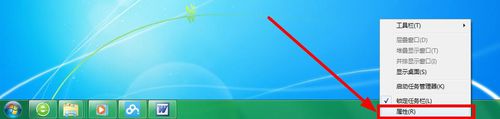
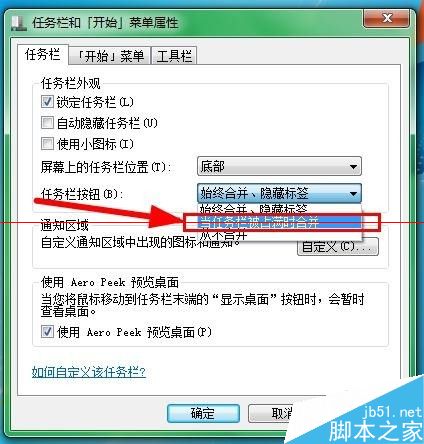
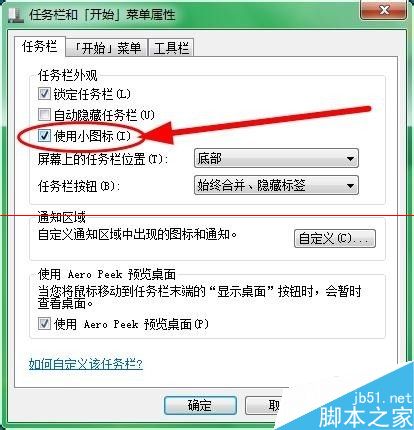
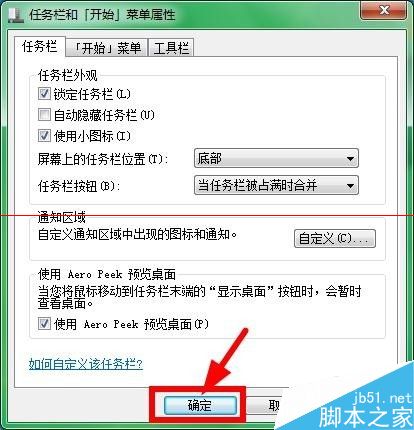
Windows 7 預設工作列使用大圖示、隱藏標籤、自動合併同類按鈕,許多習慣 XP 的用戶感到不適。透過「工作列與開始功能表屬性」可快速調整為傳統風格。
調整後工作列顯示完整程式標題、小圖示、不自動合併,操作效率大幅提升,強烈推薦給多視窗重度用戶。
Win7 Windows Easy Transfer 使用教學:舊電腦資料輕鬆遷移到新電腦
Win7 只能上 QQ 無法開網頁?修改 DNS 秒解決
解決 Windows 7 網路探索無法啟用、印表機共用失敗的完整指南
Win7 系統 Internet Explorer 瀏覽器被惡意程序劫持解決方法
Win10 RTM 版預計 7 月底發布,暫不內建 Edge 瀏覽器
Win10 開發版本躍升至 10100,BUILD 大會將推重大公開預覽版
Win10 10525 啟動錯誤 0x8007232B 原因:無法連線至啟動伺服器
升級 Win10 正式版後觸控板手勢有哪些變化?11 個必學多點觸控手勢圖解