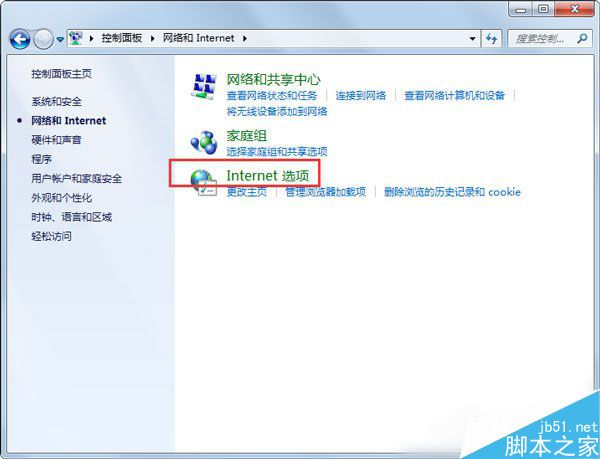
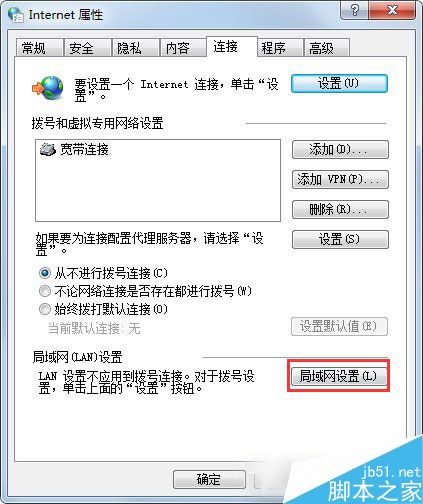
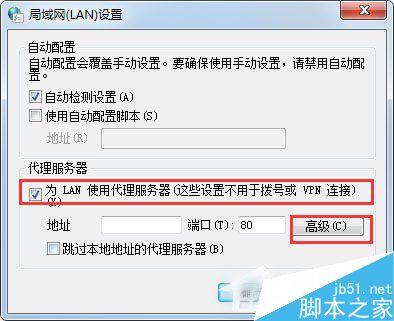
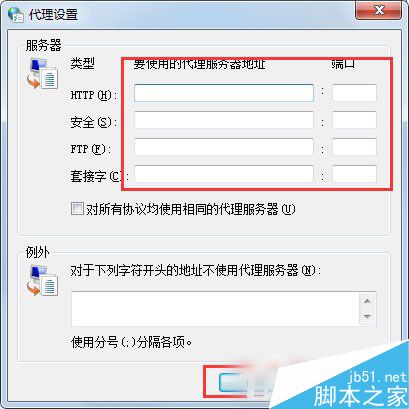
代理伺服器可提升瀏覽速度、突破 IP 限制存取國外站點。Win7 內建代理設定介面,幾步完成配置。
設定生效後,瀏覽器流量將經由代理伺服器轉發。
Win7 變更視窗框線與工作列顏色雙法教學:個人化設定與控制台外觀
微軟承認 Bug 導致 Win7/8 遭強制升級 Win10,錯誤代碼 0x80240020 成禍首
Windows 7 縮圖預覽顯示緩慢?群組原則啟用「關閉縮圖快取」反而加速顯示
Windows 8 還原/重設電腦提示「請插入媒體」:需插入安裝光碟
Win7 操作中心無法開啟?一招教你快速修復 Security Center 服務
Win10 啟動後提示「授權即將到期」?KMS 啟動限制與正版授權完整說明
Windows 10 以系統管理員身分開啟命令提示字元 (CMD) 三種方法
Windows 8 複製檔案新體驗:單一進度視窗與暫停/續傳功能詳解