Windows XP Windows 7 Windows 2003 Windows Vista Windows 綜合教學 Linux 系統教學
Windows 10 Windows 8 Windows 2008 Windows NT Windows Server 電腦軟體教學
您现在的位置: Windows教程網 >> Windows教程 >  >> Windows 綜合教學 >> 關於 Windows

Win8 升級 Win10 提示「升級更新失敗」?清理 SoftwareDistribution 或重設網路/註冊 DLL 兩大方案修復

編輯:關於 Windows

Win8 升 Win10 遇「升級更新失敗」,原因多樣。提供兩套經驗修復方案,按順序嘗試。

方案一:清理 Windows Update 快取

  1. 以管理員身分開啟「命令提示字元」。
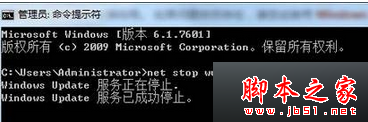
  2. 輸入 net stop wuauserv 回車 → 刪除 C:\Windows\SoftwareDistribution\Download 與 DataStore 資料夾內容。
  3. 輸入 net start wuauserv 回車 → 重試升級。

方案二:重設網路堆疊與修復系統檔/註冊核心 DLL

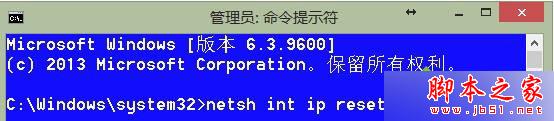
  1. 管理員 CMD 執行 netsh int ip reset 回車。
  2. 執行 SFC /SCANNOW 掃描修復系統檔。
  3. 依序註冊 10 個核心 DLL:
    REGSVR32 C:\Windows\system32\cryptdlg.dll
    REGSVR32 C:\Windows\system32\dssenh.dll
    REGSVR32 C:\Windows\system32\gpkcsp.dll
    REGSVR32 C:\Windows\system32\initpki.dll
    REGSVR32 C:\Windows\system32\mssip32.dll
    REGSVR32 C:\Windows\system32\rsaenh.dll
    REGSVR32 C:\Windows\system32\sccbase.dll
    REGSVR32 C:\Windows\system32\slbcsp.dll
    REGSVR32 C:\Windows\system32\softpub.dll
    REGSVR32 C:\Windows\system32\wintrust.dll

  4. 重新開機後再試升級。

相關閱讀

  • Win10 家用版升專業版失敗提示無法升級故障解決
  • Win7 升 Win10 失敗錯誤 0x8007002c-0x4000D 解決
Copyright © Windows教程網 All Rights Reserved