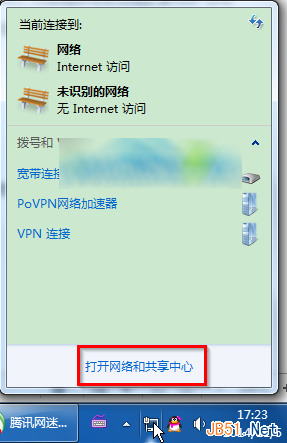
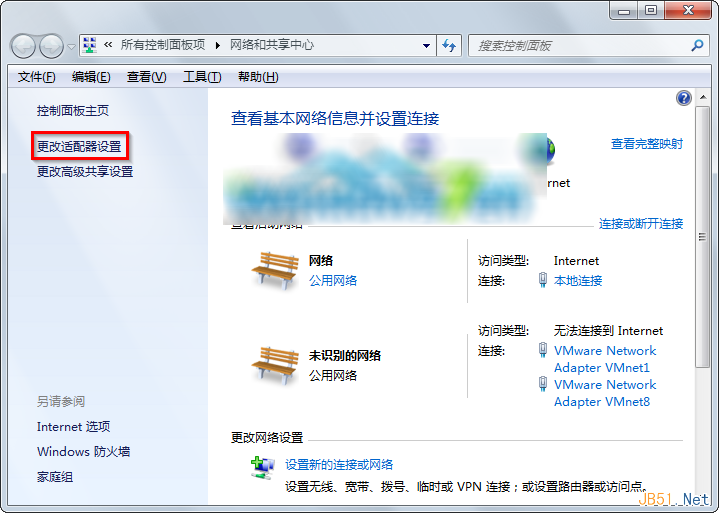
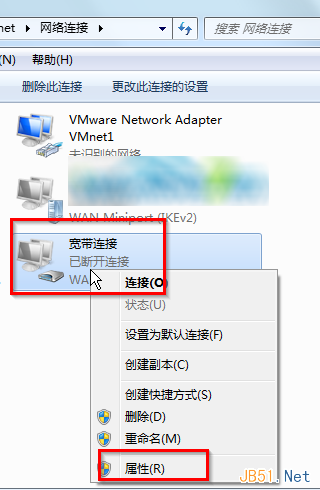
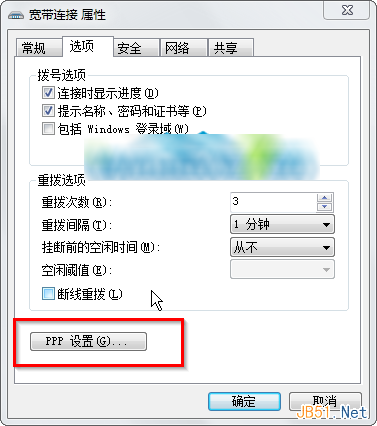
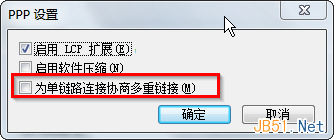
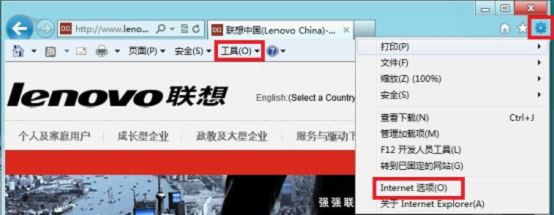
錯誤 733 因系統啟用「為單一連線協商多重連結」(PPP 多重連結協商) 導致。解決步驟:
完成後重新撥號即可解決錯誤 733。
WinXP「應用程式發生異常 未知的軟體異常」原因分析與多重解決方案
Windows Update 更新失敗修復指南:停用服務、清除暫存、重啟服務三步驟
Win10 遙測資料四等級完整解析:企業版專屬「安全性」等級 0,一般用戶最低只能設「基本」等級 1
WinXP 刪除不需要的輸入法:透過控制台「文字服務與輸入語言」移除
Win7 判斷是否需手動安裝 KB3161647 更新補丁指南
Win8.1 磁碟分區教學:三步驟壓縮現有分區建立新分區
Win10网页字体模糊不清?关闭IE/Edge GPU加速渲染恢复清晰
Windows 7 無法辨識 2TB 希捷行動硬碟(藍屏後消失)的驅動程式重裝解法