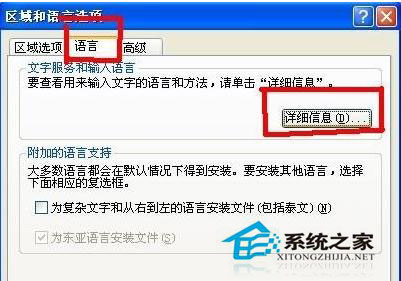
Windows XP 預設輸入法不一定適合每人,安裝多套輸入法後切換不便,可依下列步驟移除不常用的輸入法。
完成後該輸入法即從切換清單消失,騰出系統資源並簡化切換操作。
Win10 如何還原至 Win7/Win8?系統屬性「啟動與修復」切換預設作業系統法
Win7 如何開啟 .pst 檔案?Outlook 資料檔匯入完整步驟
Windows 10 開啟內建防火牆教學
Win10 桌面背景與主題色怎麼設?個人化設定完整圖文教學(含瀏覽自訂圖片、自動挑色、投影片輪播)
Windows 10 鎖畫面高畫質壁紙完整合集下載(含儲存路徑與安裝教學)
XP 系統 ekrn.exe 佔用 CPU 100%?關閉 NOD32 監控並清理 Windows Update 快取解決
Win10 Mobile 10136 單手模式實測影片:長按開始鍵畫面下沉,大螢幕單手操作無壓力
VirtualBox 安裝 Win10 出現花屏/磁貼渲染異常?關閉 3D/2D 加速即可解決