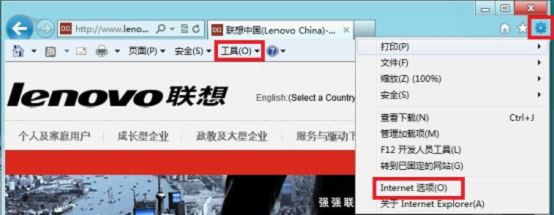
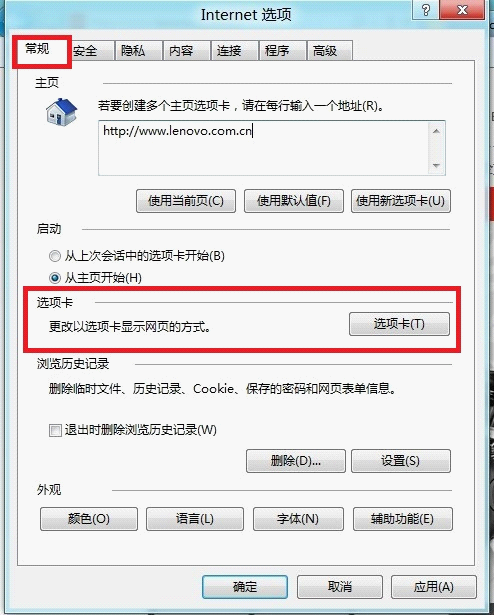
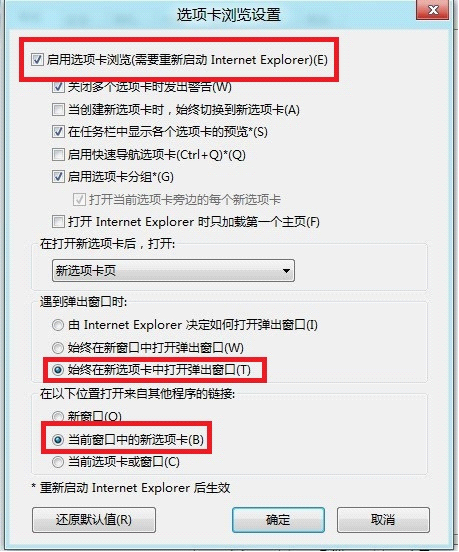
Internet Explorer 10 預設可能在新視窗開啟連結,改為新索引標籤可減少視窗雜亂。
同樣適用於 IE9/IE11,介面略有差異但選項相同。
Win7/Win8.1 升級 Win10 TH2 正式版完整圖文教程(掛載 ISO 執行 setup.exe)
Win10 升级后输入法图标消失?任务栏设置中开启“输入指示器”找回
微軟發布 Win10 IoT Core 1511 物聯網版系統鏡像正式版下載(含 ARM/x86、開發板專用版)
XP 系統寬頻連線失敗錯誤 619 怎麼辦?三大原因與解決方案一次看懂
Win8 無開始選單怎麼找控制台?從所有應用清單進入
Win10 預覽版 (Build 9841/9860) 商店應用可直接拖曳建立桌面捷徑
Win10 提示「乙太網路沒有有效的 IP 設定」?重設 Winsock + 重啟網卡 + 服務檢查完整解決
Win8 啟用飛行模式後 WiFi 無法使用?疑難排解自動修復網路介面卡