Windows XP Windows 7 Windows 2003 Windows Vista Windows 綜合教學 Linux 系統教學
Windows 10 Windows 8 Windows 2008 Windows NT Windows Server 電腦軟體教學
您现在的位置: Windows教程網 >> Windows教程 >  >> Windows 綜合教學 >> 關於 Windows

Win10 預覽版 (Build 9841/9860) 商店應用可直接拖曳建立桌面捷徑

編輯:關於 Windows

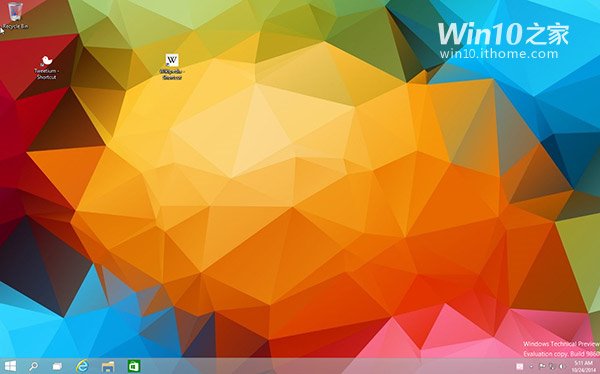
Windows 10 技術預覽版(含 Build 9841、9860)整合動態磚與傳統開始選單,並支援直接將 Modern/商店應用拖曳至桌面建立捷徑,包含系統內建應用與第三方應用。習慣桌面操作的用戶無需進入開始選單即可啟動常用 Modern 應用。

操作示範

  1. 開啟開始選單/開始畫面,找到目標 Modern 應用圖示。
  2. 按住滑鼠左鍵拖曳至桌面空白處放開。
  3. 桌面自動建立捷徑(箭頭圖示),雙擊即可啟動對應 Modern 應用。

拖曳建立捷徑
▲ 直接拖曳商店應用至桌面建立捷徑

補充

  • 此功能為預覽版眾多改進中細節之一,正式版同樣保留。
  • 消費者導向預覽版預計次年釋出,目前版本偏向企業測試。
Copyright © Windows教程網 All Rights Reserved