Windows XP Windows 7 Windows 2003 Windows Vista Windows 綜合教學 Linux 系統教學
Windows 10 Windows 8 Windows 2008 Windows NT Windows Server 電腦軟體教學
您现在的位置: Windows教程網 >> Windows教程 >  >> Windows 綜合教學 >> 關於 Windows

Win7 執行軟體提示「無法定位動態連結庫 user32.dll」解決法:複製 dwmapi.dll 至程式目錄

編輯:關於 Windows

Win7 執行特定軟體時彈出「無法定位動態連結庫 user32.dll」,實際上是該程式目錄缺少或版本不符的 dwmapi.dll。將系統目錄下的正確版本複製覆蓋即可修復。

修復步驟

  1. 重啟或登出電腦,確保目標程式未在執行。
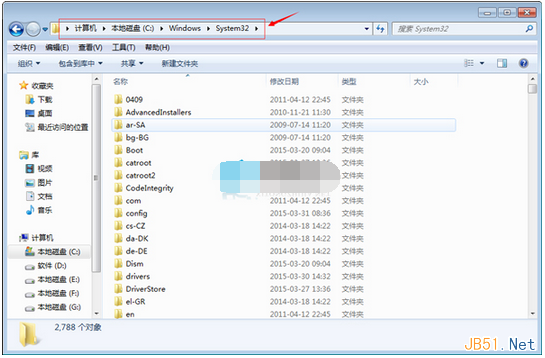
  2. 開啟檔案總管,前往 C:\Windows\System32(64位系統另需檢查 SysWOW64)。
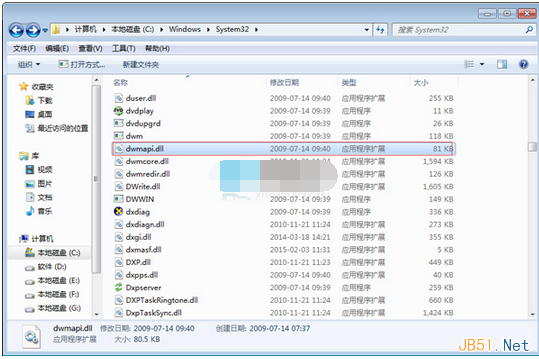
  3. 找到 dwmapi.dll,複製。
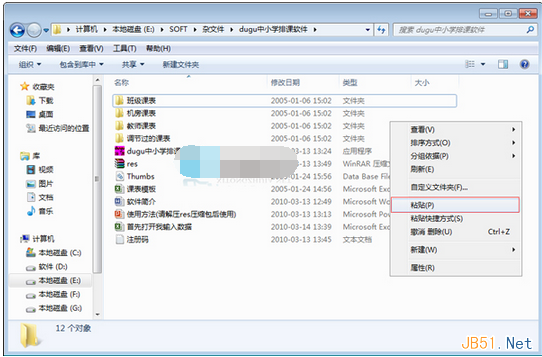
  4. 貼上至發生錯誤軟體的安裝資料夾(如 C:\Program Files\xxx),選擇「取代目的地檔案」。
  5. 重新啟動軟體,錯誤應消失。

System32 目錄尋找 dwmapi.dll

複製 dwmapi.dll

貼上至程式目錄覆蓋

原理說明

  • user32.dll 為 Windows 使用者介面核心 API,極少遺失;錯誤訊息具誤導性。
  • 實際上軟體載入 dwmapi.dll(Desktop Window Manager API)失敗,導致呼叫鏈中斷,系統誤報為 user32.dll。
  • 系統目錄的 dwmapi.dll 版本與 OS 同步,相容性最佳。

注意事項

  • 僅適用於「軟體自帶舊版/損壞 dwmapi.dll」的情況,若為病毒感染或系統檔案損壞,請執行 sfc /scannow 或全盤掃毒。
  • 修改前建議備份原檔案(改名為 dwmapi.dll.bak)。
Copyright © Windows教程網 All Rights Reserved