Windows 7 使用 IE 瀏覽網頁時彈出「Internet Explorer 已經遇到增益集故障並且需要關閉」,通常是增益集(附加元件)損毀或衝突所致。提供兩種修復方案。
yesok.bat:regsvr32 /s urlmon.dll
regsvr32 /s shdocvw.dll
regsvr32 /s browseui.dll
regsvr32 /s jscript.dll
regsvr32 /s vbscript.dll
regsvr32 /s mshtml.dll
regsvr32 /s msjava.dll
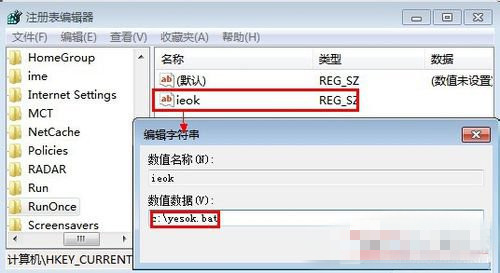
regsvr32 /s actxprxy.dllregedit,定位至:HKEY_CURRENT_USER\Software\Microsoft\Windows\CurrentVersion\RunOnceieok),數值資料填 c:\yesok.bat(依實際儲存路徑調整)。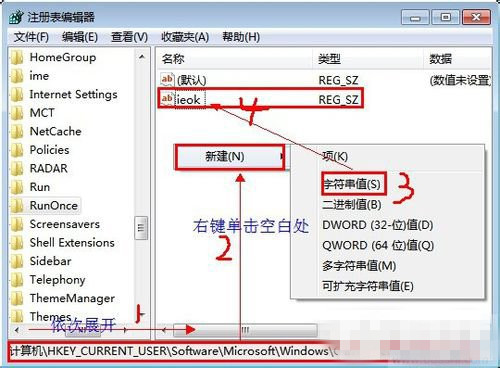
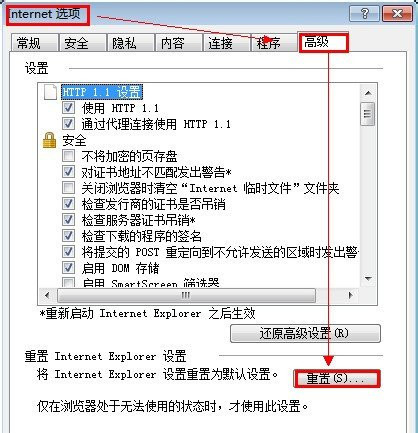
建議優先嘗試方法二,若問題持續再嘗試方法一。定期清理不必要的工具列與增益集可減少故障發生機率。
Win10 虛擬桌面完整操作教學:建立、切換、關閉多桌面提升多工效率
Windows 10 預覽版 10122 升級後無法啟動?使用 SLMGR 指令安裝 KMS 金鑰解決
Win10 無法開啟 .exe/.chm 電子書?解除鎖定、檢查路徑特殊字元、7-Zip 解壓替代方案
所有 Win 10 用戶均可使用 Windows 回饋應用,Insider 會員享額外功能:截圖、篩選、複製問題
Windows 7/8.1 升級 Windows 10 後螢幕閃爍解決方案:停用兩項錯誤回報服務
Win10 手動設定 Proxy 代理伺服器:設定→網路和網際網路→Proxy→關閉自動偵測→開啟手動代理→填入伺服器位址/連接埠→儲存