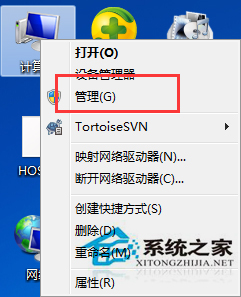
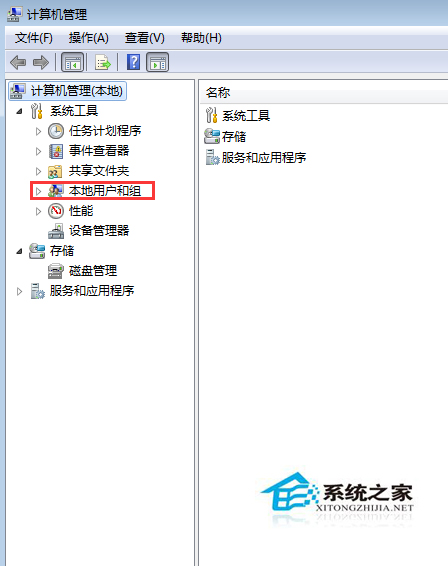
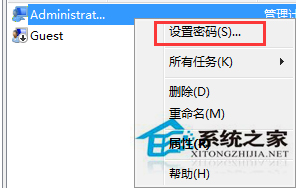
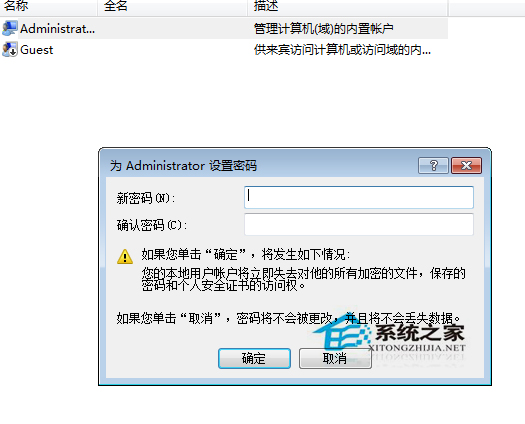
需修改他人帳戶密碼,前提為管理員權限:
僅在真正需要時操作,切勿濫用。
Win10/8.1/8 磁碟使用率 100% 完整解決方案:六大優化與終極建議
Win10老遊戲無法全屏?註冊表修改縮放模式 + 啟用 DirectPlay 兩步破解
Win10 創作者更新預覽版 Build 15002.1001 曝光,15003 傳聞被證實為假
Win10 開機必須重啟才能輸入密碼?關閉快速啟動解決
Win7 卸載軟體提示權限不足:以系統管理員身分執行 Uninstall.exe 解決
Win10 任務列隱藏時鐘教學:三種方法自訂系統托盤
Win10 專業版找不到「說明與支援」?三種方式快速獲取系統協助
Win10 應用商店下載完成卻無法安裝?一鍵清除快取 (wsreset) 即可解決