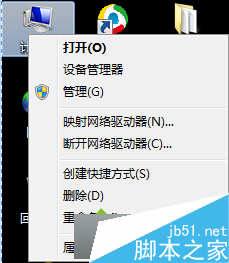
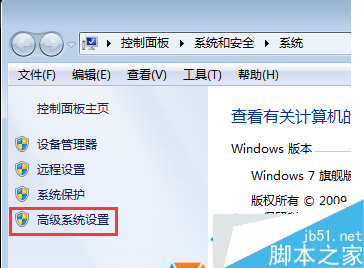
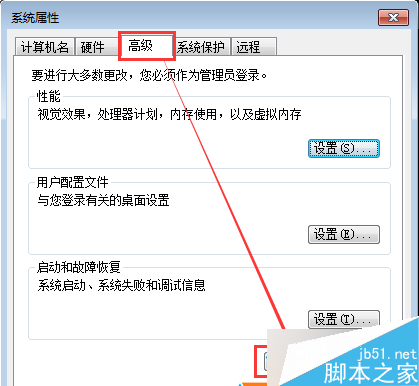
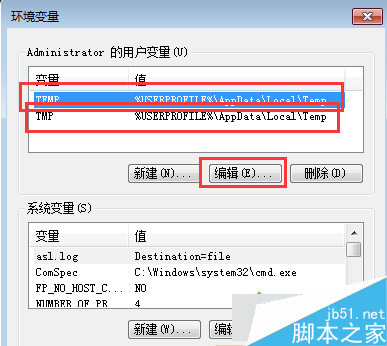
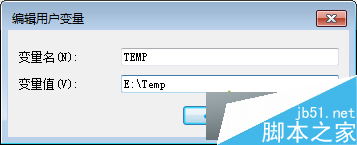
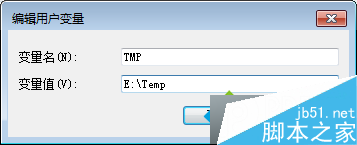
C 槻空間不足常因暫存檔累積。修改使用者與系統 TEMP/TMP 環境變數指向其他磁碟(如 E:\temp),一勞永逸解決空間壓力。
TEMP
TMP
E:\temp
Win7 設定螢幕重新整理率完整教學:解決畫面抖動、模糊問題
Windows 8 相容模式安裝獵豹瀏覽器:右鍵疑難排解 → 試用建議設定 → 測試程式完整步驟
Win10 免費升級 7/29 截止,之後授權 770 元起:免費期倒數與付費版本價格說明
Win8/8.1 右鍵選單新增 Windows Defender 掃描功能:註冊表手動部署教學
Win7 64位系統如何查看串口號(COM 口)?裝置管理員圖解
Windows 7 遠端桌面連線完整設定教學:主機端與客戶端雙向圖解
Win7 關閉「Windows 安全性網路驗證」彈出視窗?取消網路介面卡驗證選項
Win10 PC 週年更新預覽版 14393 修復內容與已知問題彙整