Windows 10 內建 WIA 掃描精靈 (wiaacmgr) 可直接操作掃描儀,支援色彩模式、解析度、檔案格式與掃描範圍預覽設定。
wiaacmgr 並執行。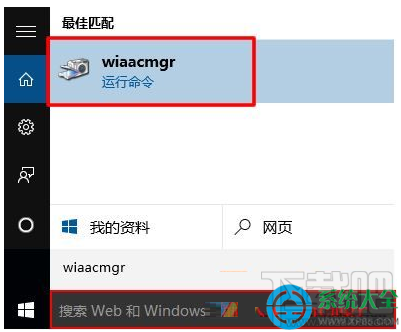
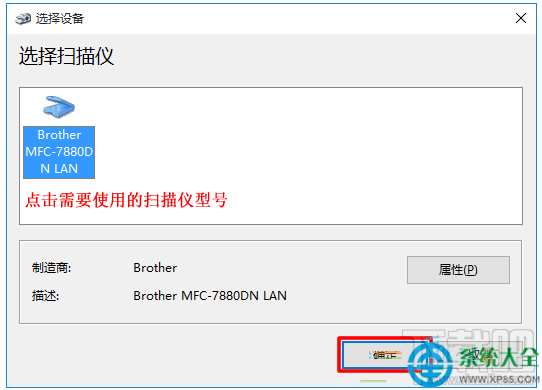
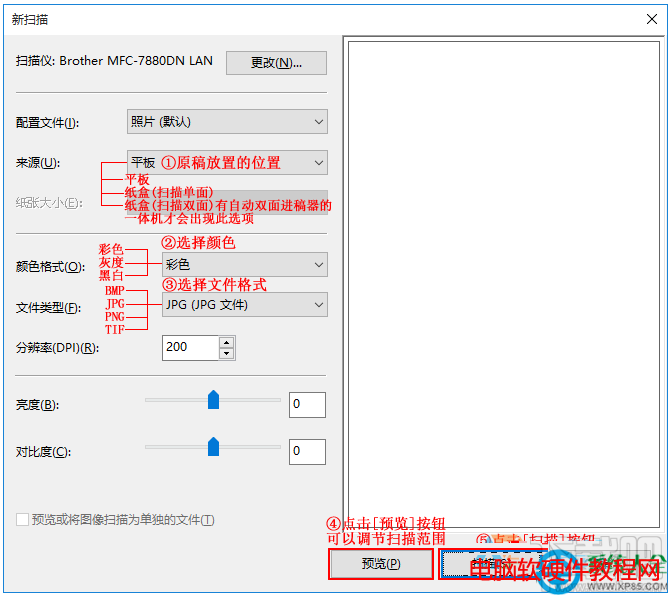
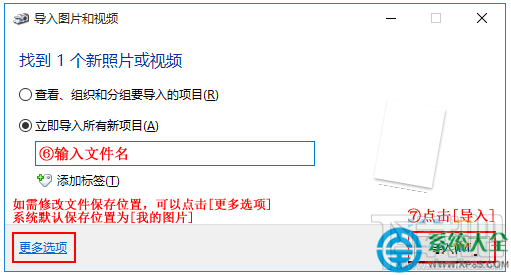
無需安裝廠商掃描軟體,內建工具即可滿足基本掃描需求。
Win7 如何設定 Proxy 代理伺服器?Internet 選項 → 區域網路設定 → 進階代理設定圖文教學
使用 Microsoft Fix it Center 自動修復 Windows 系統常見問題
Win10 應用商店閃退/無法開啟?DISM 掃描修復或 PowerShell 重裝兩大招
Win10 讓資料夾圖示顯示自訂文字,善用預覽縮圖機制一眼識別內容
Windows 10 Build 10154 介面微調與更新一覽:Phone Companion 正常化、Store 更新
Win10 將中文登入使用者資料夾名稱改為英文:註冊表 ProfileImagePath 雙重修改法