Windows 7 筆電休眠喚醒後 Wi-Fi 斷線,主因是網卡電源管理設定允許系統為省電關閉裝置。關閉此選項即可解決。


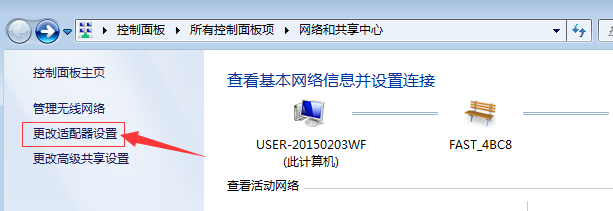
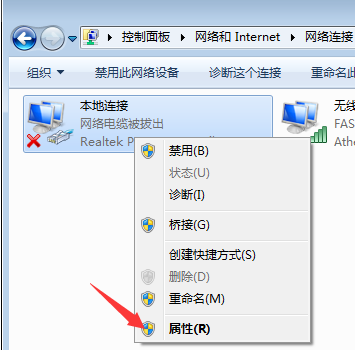
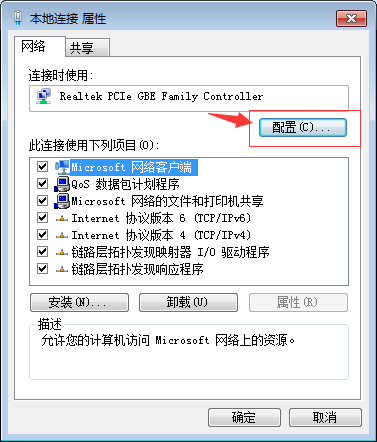
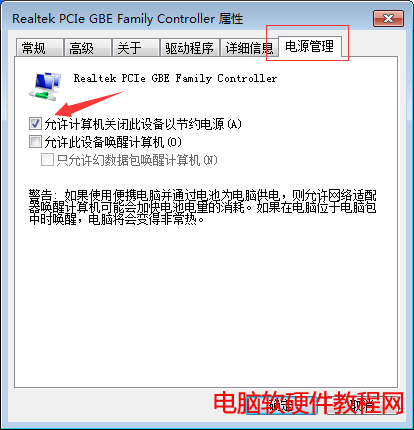
設定完成後,休眠喚醒即可保持 Wi-Fi 連線,免除重新連線困擾。亦可直接設定「不休眠」避免問題。
Win10 強制升級圖文教學:停用服務、清理快取、wuauclt 指令、檢查更新四步驟(需先預約升級)
開發者必升 Win10 Build 10061:修復 Hyper-V、VS 崩潰、Spartan 瀏覽器問題
Win7 開機黑屏只剩滑鼠?重啟 explorer.exe 與修復登錄檔徹底解決
Win10 工行網銀無法輸入密碼?IE 相容性檢視 / 獵豹瀏覽器切換核心可解
Win10 平板電腦使用評測影片:觸控優化、模式切換、任務切換流暢度實測
Win8 正式停止支援 升級 Win8.1/Win10 還是降級 Win7?完整分析
Windows 10 累積更新 KB3206309 推送 Build 14986.1001,疑似修復 Windows Defender 相關問題