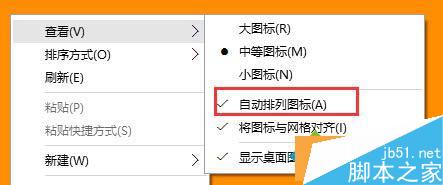
Win10 桌面圖示拖曳後會自動彈回原位,主因是啟用了「自動排列圖示」。解法極簡單:
取消後即可隨意拖曳圖示至任意位置,不再自動歸位。
Windows 7 設定 DNS 伺服器位址完整圖文教學
升級 Win10 後沒聲音?驅動更新、輸出裝置設定、服務重啟 3 大方向完整排除
Win10 Mobile/PC 預覽版 14951 與累積更新 14393.351 同步測試中
微軟修補星期二修復存在 19 年 Windows 95 時代漏洞
Win10 正式版應用商店更新:修復圖示 Bug、新增 Groove Music Pass 串流播放支援
Win8 開機藍畫面 0x0000008E 解決方法:記憶體、硬碟、磁碟碎片整理
Win10 如何清除「選擇圖片」歷史縮圖?更換幾張桌布即可覆蓋
硬碟安裝 Win10 專業版圖文詳解,軟媒魔方硬碟裝機免隨身碟