Windows 10 隱藏資料夾最簡單的方法是透過資料夾屬性勾選「隱藏」屬性,再搭配資料夾選項「不顯示隱藏檔案」即可達到隱藏效果。
www.pc841.com),放入機密檔案。若需查看隱藏資料夾,請至「檔案總管」 → 「檢視」分頁 → 勾選「隱藏的項目」,或參考「Windows 10 顯示隱藏檔案或資料夾方法」。
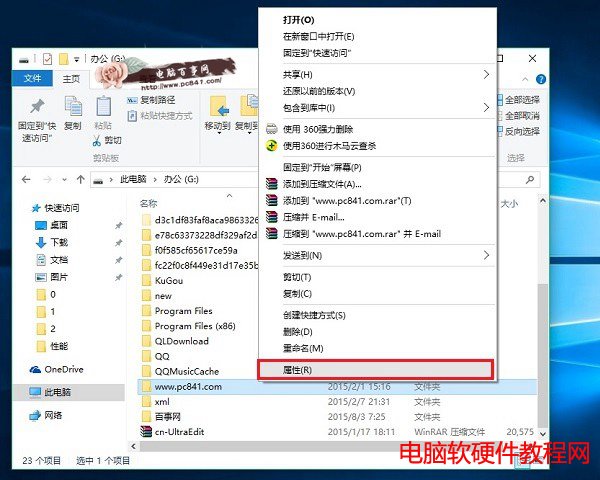
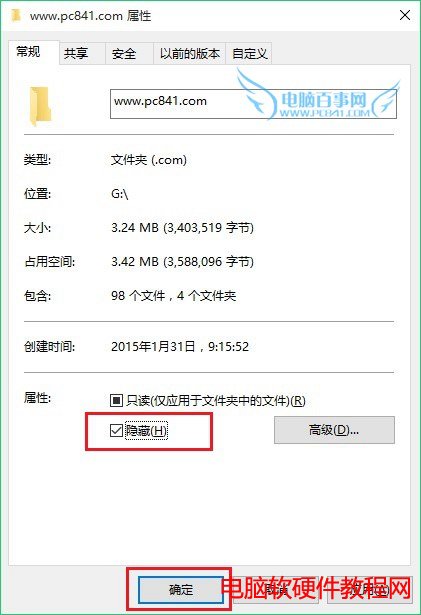
此法簡單有效,適合一般隱私檔案保護,但非加密保護,重要資料建議搭配 BitLocker 或壓縮加密使用。
破解 Win8 IE10 Flash 網站白名單限制,瀏覽任意 Flash 內容
IFA 2015 微軟 Win10 OEM 新品發布會 圖文直播完整實錄 (筆電、二合一、平板、IoT、Xbox 串流、Cortana、Continuum)
Win10 周年更新累積補丁 KB3176929 內容彙總:Build 14393 → 14393.10 七大修復項目
Win10 執行軟體跳出「Windows 已保護你的電腦」?關閉 SmartScreen 篩選器徹底解決
Windows 10 行動裝置如何錄製慢動作影片?WinHEC 曝光相機新功能支援可變幀率
Windows Server 2008 IIS 7 驗證碼無法顯示?啟用 ASP「啟用父路徑」即可解決