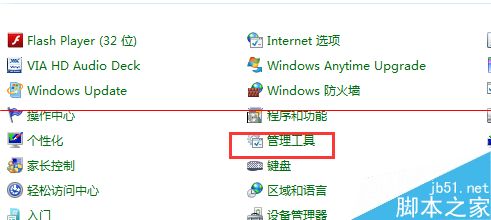
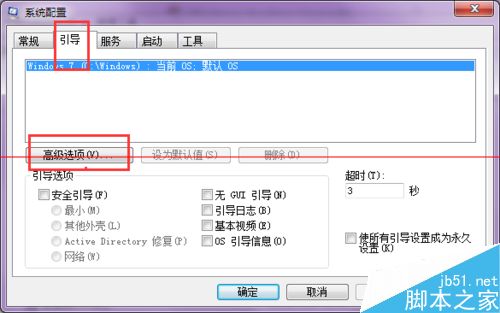
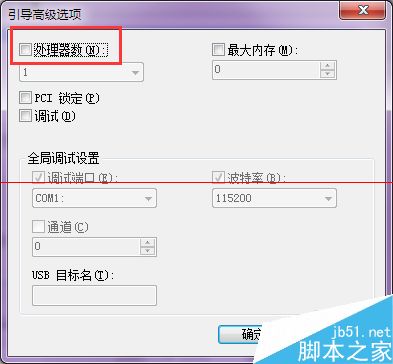
Windows 2008 R2 48 核心 CPU 安裝 Oracle 11.2.0.1 建立資料庫實例卡在 2%,解決方法:
注意:Oracle 會建立兩組監聽器與服務,安裝完成後請停用對應服務避免衝突。此問題源於早期 Oracle 版本對高核心數 CPU 支援不完善。
Win8/8.1 安裝驅動程式提示「資料無效」?啟動 Device Install Service 與 DsmSvc 服務完美解決
Win10 磁碟使用率 100% 卡頓?10 招優化徹底解決
Windows 7 隱藏神技「上帝模式」啟用教學:新增資料夾命名 GodMode.{ED7BA470-8E54-465E-825C-99712043E01C}
Win10 提示「工作管理員已由系統管理員停用」怎麼辦?群組原則啟用教學
Windows 8 檔案總管導覽窗格隱藏「收藏夾」教學
Win8 搜狗瀏覽器提示「已修改網頁以防禦跨站腳本」解決方案
Windows 新增虛擬網卡(Microsoft Loopback Adapter)完整圖文教學
微軟警告:64 位元 Win7 SP1 可能無法安裝 KB3033929 更新,錯誤代碼 80004005