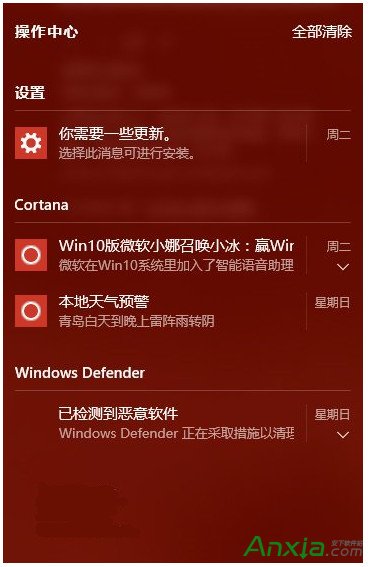
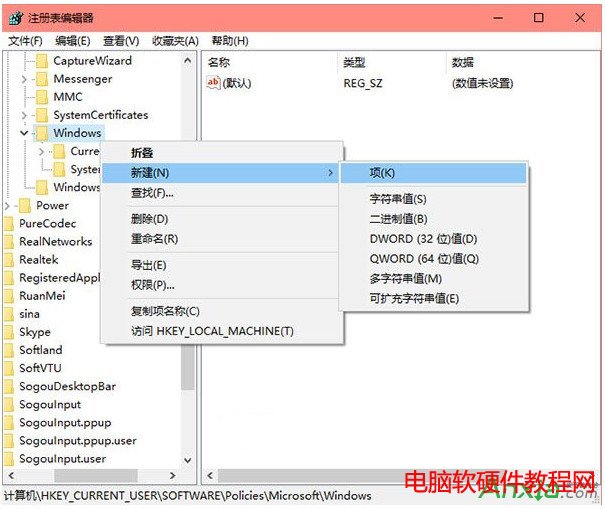
Win10 操作中心頻繁彈出通知干擾。徹底關閉方法 (修改登錄表):
Win+R
regedit
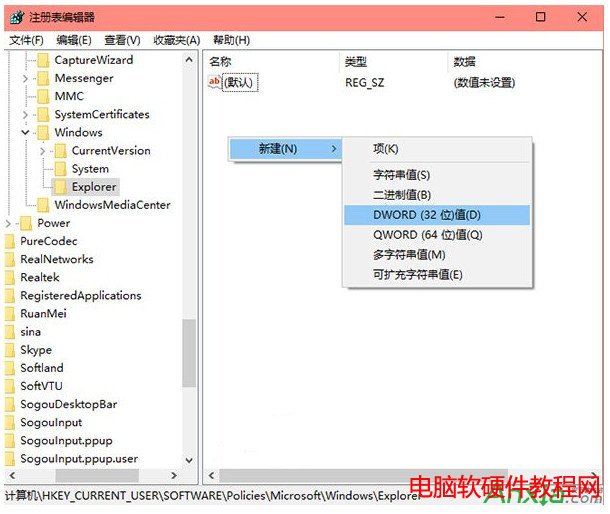
HKEY_CURRENT_USER\SOFTWARE\Policies\Microsoft\Windows\Explorer
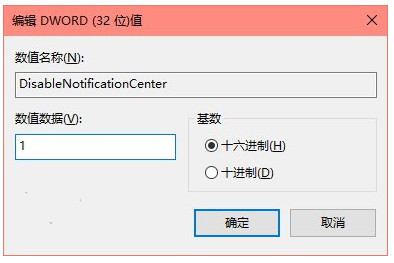
DisableNotificationCenter
1
提醒:修改登錄表有風險,建議先備份 (可用軟媒魔方清理大師備份)。
Win10 Continuum 模式使用教學:登錄表啟用全新開始畫面
Win7 開啟檔案與印表機共用設定教學 (附啟動工具下載)
Windows XP 系統核心檔案完整解析:350+ System32 檔案功能與保留必要性說明
Win10 「此電腦」移除/恢復 6 大預設資料夾(視頻/圖片/文檔/下載/音樂/桌面)註冊表一鍵腳本法
Windows 10 預覽版全新安裝與雙系統安裝方法圖文詳解(三種方案任選)
Windows 7 64位元控制台完整介紹:三種檢視模式(類別/大圖示/小圖示)切換教學
Windows 8 高級啟動選單遺失「自動修復」:三條命令列指令快速恢復
Win10 筆電鍵盤失靈但外接鍵盤正常?重裝 PS/2 鍵盤驅動程式解決