Windows XP Windows 7 Windows 2003 Windows Vista Windows 綜合教學 Linux 系統教學
Windows 10 Windows 8 Windows 2008 Windows NT Windows Server 電腦軟體教學
您现在的位置: Windows教程網 >> Windows教程 >  >> Windows 綜合教學 >> 關於 Windows

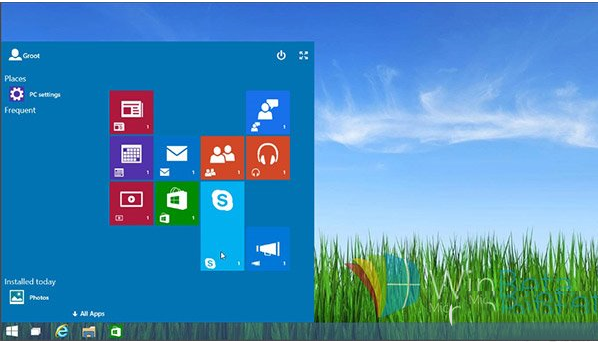
Win10 Continuum 模式使用教學:登錄表啟用全新開始畫面

編輯:關於 Windows

Win10 Build 9879 含早期 Continuum 模式開始畫面,透過登錄表啟用體驗垂直磚區介面。

啟用步驟 (同 ID 76631):

  1. regedit 定位 HKEY_LOCAL_MACHINE\Software\Microsoft\Windows\CurrentVersion\ImmersiveShell\Launcher (無則自建)。
  2. 新建 DWORD UseExperience = 1。
  3. 重啟檔案總管 (Shift+Ctrl 右鍵開始按鈕→結束檔案總管→工作管理員執行 explorer.exe)。

功能屬早期開發階段,Bug 較多;還原將值改回 0 並重啟檔案總管。

Copyright © Windows教程網 All Rights Reserved