Win7 捷徑圖示全部變成相同圖示,因誤操作導致 .lnk 檔案關聯錯誤。修復登錄檔 HKEY_CURRENT_USER\Software\Microsoft\Windows\CurrentVersion\Explorer\FileExts\.lnk 即可恢復。
regedit.exe。HKEY_CURRENT_USER\SOFTWARE\MICROSOFT\WINDOWS\CURRENTVERSION\EXPLORER\FILEEXTS\.LNKOpenWithList 與 OpenWithProgids,右側視窗中 刪除除「預設」外的所有鍵值。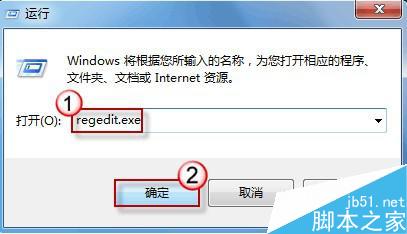
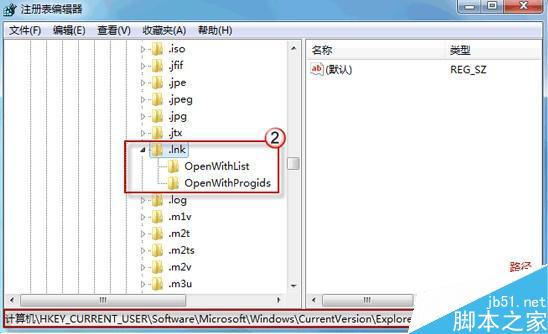
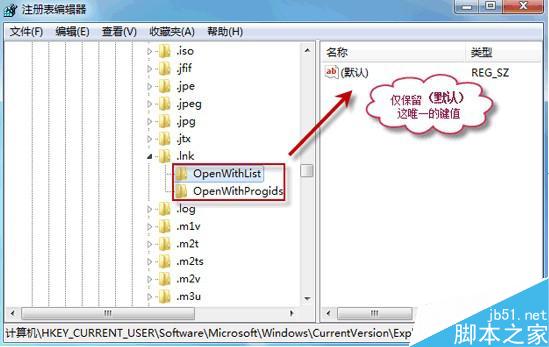
此問題純屬使用者誤操作導致關聯混亂,登錄檔清理後即可完美恢復,無需重裝系統。
Win8.1 執行應用程式跳出 0xc000007b 錯誤?DirectX 修復工具一鍵搞定
修改 Windows 7 使用者資料夾預設路徑:騰出 C 槽空間、分流資料儲存
Windows 10 Build 10125 開始選單與 Cortana 無法開啟?安裝中文語音/手寫包解決
Win10 如何建立 PIN 碼登入?取代密碼、免按 Enter、更快速安全
Win 開始選單缺少「執行」選項?透過工作列屬性自訂顯示或用 Win+R 快捷鍵
Windows 7 新增寬頻撥號連線 (PPPoE) 圖解教學:控制台 → 網際網路選項 → 連線