使用 Windows 7/8 的使用者常遇到明明點選關機,隔天發現電腦還開著,螢幕顯示「有程式未關閉」的提示視窗。這是因為系統預設會等待程式回應,導致關機延遲。透過群組原則可設定強制終止阻礙關機的程式,實現快速關機。
1、按 Win+R 輸入 gpedit.msc 開啟群組原則編輯器(Win 7/8 皆適用)。
gpedit.msc
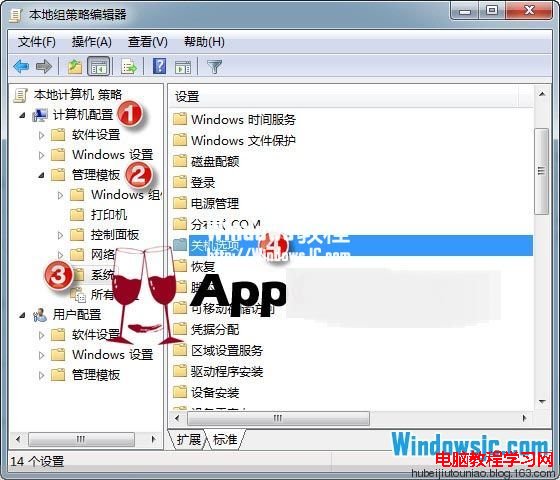
2、依序展開:電腦設定 → 系統管理範本 → 系統 → 關機選項,雙擊「關閉會阻止或取消關機的應用程式的自動終止功能」。
3、在彈出視窗中選擇「已啟用」,按下確定即可。
WinXP 輸入法圖示不見了?五大找回法:工具列、文字服務、語言列、ctfmon、登錄檔
U盤加速(ReadyBoost)原理與適用場景深度解析
Win10 9879 無法安裝 KB3020114 更新根因與解決方案
Win7 找不到 NVIDIA 控制台?更新驅動、啟動服務、檢查啟動項三步驟找回
Win8/8.1 筆電關不了機、卡在「正在關機」?卸載 VirtualBox 即可解決
Windows 8 自動修復失敗?使用系統還原解決無法開機問題
Windows Server 2012 設定網路負載平衡 (NLB) 叢集完整圖文教學
Win7 無法在 360 網頁玩遊戲?360 安全衛士「人工服務」→「熱門工具」→「360遊戲玩不了」一鍵修復