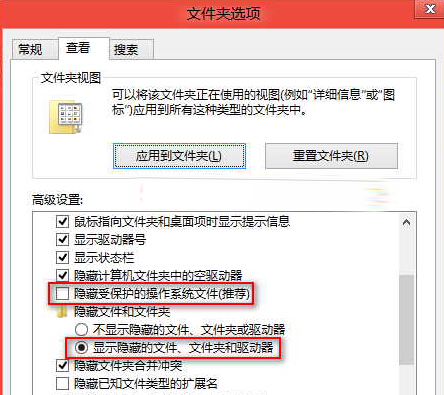
Windows 8 Modern (UWP) 應用安裝在 C:\Program Files\WindowsApps,但預設隱藏且受系統保護,需調整資料夾選項才能瀏覽。
C:\Program Files\WindowsApps
WindowsApps
注意: WindowsApps 內部結構嚴格受權限控制 (TrustedInstaller 擁有者),建議僅查看勿修改/刪除,若需移除應用請用「設定」→「應用程式」→「安裝的應用程式」解除安裝。更多 UWP 應用管理教學,請關注電腦教程專欄,歡迎加入電腦辦公群(189034526)。
IE11 相容性檢視清單網址被清除?加入「最愛」並勾選「保留最愛網站資料」永久保護
Win8.1 桌面圖標自由排列教程:取消自動排列與網格對齊
Win8 應用程式商店無法連線網際網路?三大原因與解決方案
Windows 8 設定本機帳戶密碼快速教學
Windows 8.1 取消「將圖示與網格對齊」自由擺放桌面圖示
Win8 如何更新無線網卡驅動?裝置管理員一鍵更新教學
Windows 8 遠端桌面連線完整設定與連線教學
Windows 8.1 細節 Bug:刪除確認對話框圖示出現粗糙黑邊