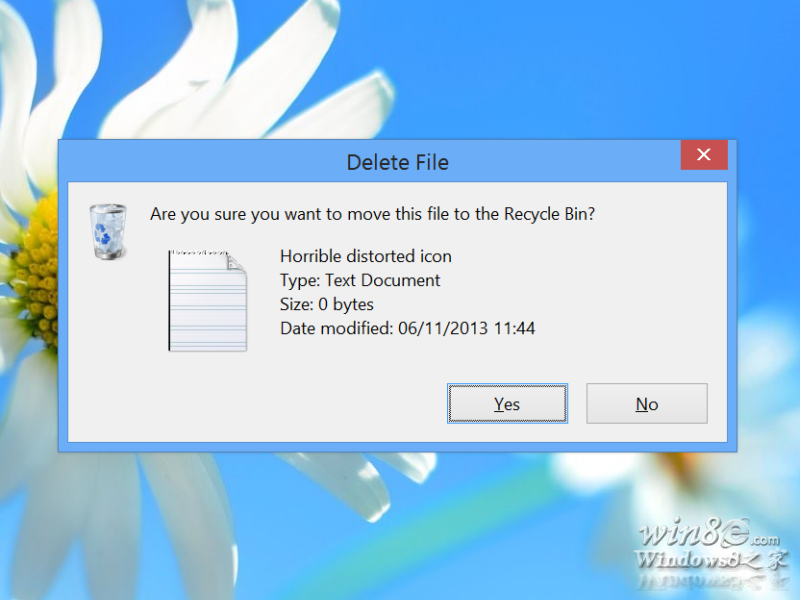
Windows 8.1 中啟用「顯示刪除確認對話框」選項(預設關閉)後,刪除檔案時確認視窗的檔案圖示側邊會出現明顯的粗糙黑邊,類似劣質陰影效果。此問題在 Windows 8 中不存在。
國外媒體判定為 8.1 系統的小型視覺 Bug。對於潔癖或強迫症用戶,建議:
不影響系統功能,純屬視覺瑕疵,微軟未發布修補程式。
Windows 8 無法使用 3G 上網卡 (天翼) 完整設定教學
Win8 如何隱藏或顯示磁碟機代號(C:、D: 等)
Windows 8 Metro 介面誤刪 IE10 圖示?教你快速找回
Win8 新增虛擬網路卡:裝置管理員「新增過時硬體」安裝 Loopback 介面
Win8 系統更新失敗錯誤 0X8DDD0007 註冊表修復法
Win8 關閉鍵盤按鍵提示音:三步驟關閉「切換鍵」功能
聯想筆電 Win 8 滑鼠滾輪失效啟用通用捲動解決法
Win8 如何修改標題列與提示框字體大小?調整 DPI 縮放比例解決字體過小