Windows 8 新開機機制(混合開機、UEFI)大幅縮短開機時間,F8 偵測視窗極短,傳統按鍵方式幾乎無效。
bcdedit /set {default} bootmenupolicy legacy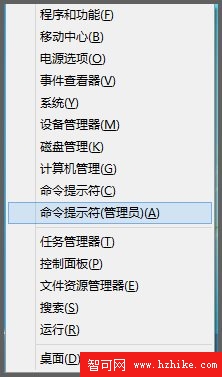
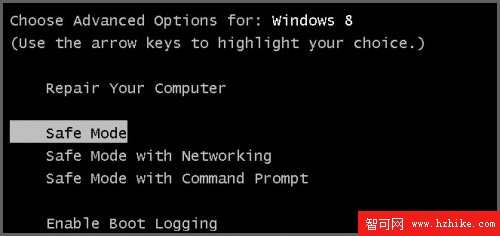
同樣以管理員 CMD 執行:bcdedit /set {default} bootmenupolicy standard → 重開機。
此設定修改開機選單原則,不影響系統檔案,安全可逆。適合習慣 F8 進入安全模式的資深使用者。
Windows 8 輸入法體驗:內建微軟拼音融合 Metro/桌面,第三方輸入法 (搜狗/QQ/百度/Google) 需重新開發支援觸控
Windows 8 升級 Windows 8.1 完整教學:Windows Store 免費更新、ISO 全新安裝、預覽版與正式版差異詳解
破解 IE10 Flash 限制:修改本地白名單讓所有網站都能播放 Flash
Windows 8 圖片密碼設定教學:觸控螢幕專屬趣味登入方式
Windows 8.1 Update 無法移除 IIS?安裝 KB2957390 修補
Win8.1 關機後自動重開機?三大解決方案徹底解決「偽關機」問題