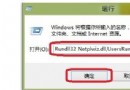
shutdown -s -t 秒數
shutdown -a
-c "訊息"
at 時間 shutdown -s
at 24:00 shutdown -s
shutdown -i
排程關機前請確認存檔重要資料。若中途有變,務必執行 shutdown -a 取消,避免資料遺失。
Windows 8.1 筆記本一鍵變身 Wi-Fi 熱點:指令法與工具法雙軌教學
Windows 8 應用技巧 50 招精選:鎖定畫面、Metro 主畫面、搜尋、工作切換、關機、IE Metro、多螢幕、天氣、拼字檢查、系統管理員執行、休眠、自動登入、快速鍵、快速啟動等核心技巧
讓 Windows 8 開機自動進入傳統桌面
Windows 8 使用「承載網路」將有線網路分享為無線熱點供手機上網
Win8 網路連線錯誤 118?CMD 三指令重置 DNS 與 TCP/IP 秒解
Windows 8 應用商店無法連網?三大常見原因與解決方案
升級 Win 8.1 後無法上網?Winsock 重置指令一鍵修復
Windows 8.1 如何建立 VPN 連線?PPTP 協定完整設定教學