Windows XP Windows 7 Windows 2003 Windows Vista Windows 綜合教學 Linux 系統教學
Windows 10 Windows 8 Windows 2008 Windows NT Windows Server 電腦軟體教學

聯想 Yoga 11S/13 升級 Windows 8.1 後平板模式卡頓?關閉 BIOS DPTF 即可解決

編輯:Windows 8 系統介紹

聯想 Yoga 11S/13 升級 Windows 8.1 後,平板/帳篷/站立模式操作明顯卡頓。根因是 BIOS 預設啟用的 Intel DPTF (Dynamic Platform and Thermal Framework) 動態節能技術,在特定姿態下過度限制 CPU 效能。

解決步驟

  1. 完全關機。
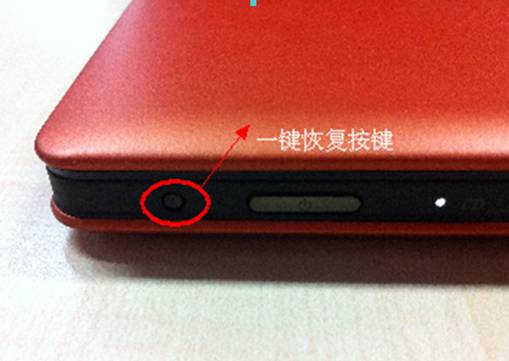
  2. 按機身側邊/鍵盤旁的 Novo Button (小圓孔復原鍵) 開機(需筆尖按壓)。
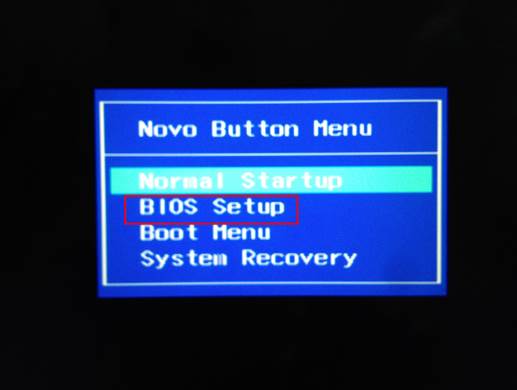
  3. 選單中選擇 BIOS Setup → Enter。
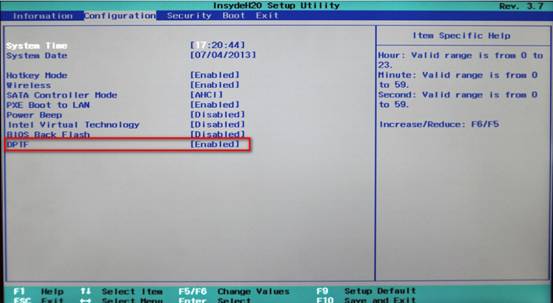
  4. 進入 Configuration 分頁。
  5. 找到 DPTF 選項,預設 Enabled,按 Enter 切換為 Disabled。
  6. Fn + F10 儲存並離開。

Novo Button 位置

BIOS 選單選擇 BIOS Setup

Configuration DPTF Disabled

原理說明

DPTF 為 Intel 節能框架,偵測裝置姿態(平板/帳篷/站立)時主動降低 CPU 功耗上限,導致觸控回應延遲、動畫掉幀。關閉後 CPU 維持完整效能,平板模式流暢度恢復正常,代價是該模式下續航力略微下降(約 5~10%)。

適用機型

  • Yoga 13 (首代)
  • Yoga 11S
  • 其他搭載 DPTF 選項的聯想二合一筆電

提醒:若 BIOS 無 DPTF 選項,請更新 BIOS 至最新版,或嘗試在 Windows 電源選擇「高效能」模式緩解。

Copyright © Windows教程網 All Rights Reserved