Windows XP Windows 7 Windows 2003 Windows Vista Windows 綜合教學 Linux 系統教學
Windows 10 Windows 8 Windows 2008 Windows NT Windows Server 電腦軟體教學

Win7 手動載入登錄檔:regsvr32 註冊 OCX/DLL 元件修復程式錯誤

編輯:Win7 常見問題解答

程式執行提示「缺少 .ocx/.dll」或「類別未註冊」,通常是 ActiveX 元件未正確註冊至登錄。以系統管理員身分執行 regsvr32 指令手動註冊,可快速修復。

操作步驟

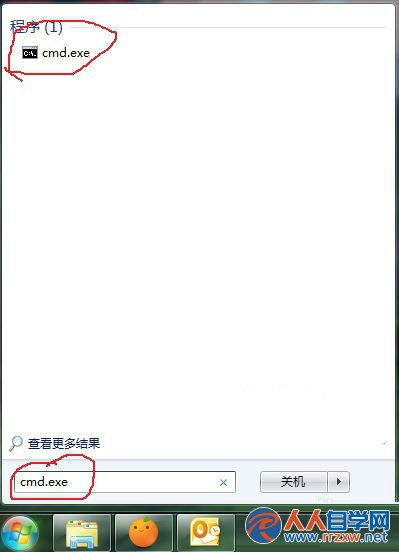
  1. 「開始」→ 搜尋 cmd.exe → 右鍵「以系統管理員身分執行」。
    以系統管理員身分執行 CMD
    CMD 系統管理員視窗
  2. 確認提示字元路徑為 C:\Windows\System32(64 位元系統註冊 32 位元元件請切換至 C:\Windows\SysWOW64)。
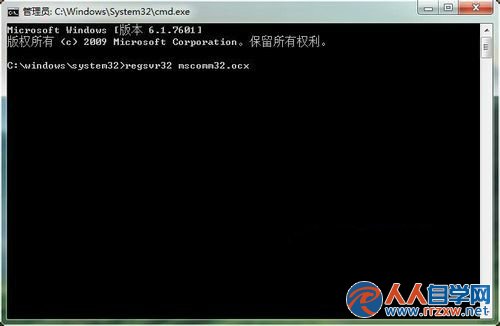
  3. 輸入指令:
    regsvr32 檔案名稱.ocx
    例:regsvr32 mscomm32.ocx → 按 Enter。
    regsvr32 註冊指令
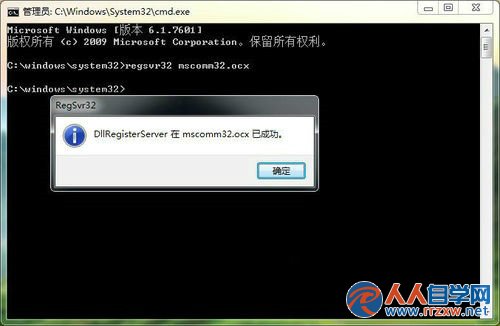
  4. 出現「DllRegisterServer 在 xxx.ocx 成功」對話框即代表註冊成功。
    註冊成功提示

常見元件: mscomctl.ocx、mscomct2.ocx、richtx32.ocx、comdlg32.ocx 等 VB6 經典控制項。若提示「模組載入失敗」,請確認檔案存在、架構相符(32 位元元件需在 SysWOW64 下註冊)、或嘗試 regsvr32 /u 檔案名 先解除註冊再重新註冊。

Copyright © Windows教程網 All Rights Reserved