Windows XP Windows 7 Windows 2003 Windows Vista Windows 綜合教學 Linux 系統教學
Windows 10 Windows 8 Windows 2008 Windows NT Windows Server 電腦軟體教學

Win7 掃毒後無法關機?登錄 PowerdownAfterShutdown 與 sfc 修復系統檔

編輯:Win7 系統應用技巧

執行防毒掃描/清理後,點選關機無反應或卡在「正在關機」。可能是防毒軟體誤刪/修改關機相關登錄或系統檔損毀。

解決步驟

  1. Win + R → regedit → 確定。
  2. 展開路徑:
    HKEY_LOCAL_MACHINE\SOFTWARE\Microsoft\Windows NT\CurrentVersion\Winlogon
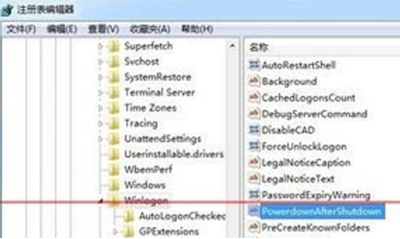
  3. 右側找到 PowerdownAfterShutdown → 雙擊 → 數值資料改為 1 → 確定。
    (若無此值,右鍵新增 字串值 命名 PowerdownAfterShutdown 設為 1)。
  4. Win + R → sfc /scannow → 確定 → 等待系統檔案檢查器掃描修復(需數分鐘)。
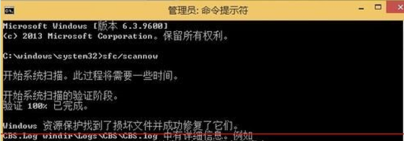
  5. 完成後重新開機測試關機是否正常。

💡 進階排查

  • 檢查事件檢視器(Win+R → eventvwr.msc)→ Windows 記錄 → 系統 → 來源 User32/Kernel-Power 關機事件 ID 1074/1076/6008,查看阻礙關機的程式/服務。
  • 服務管理員(services.msc)→ 確認 Windows Management Instrumentation、Remote Procedure Call (RPC) 等核心服務為「執行中/自動」。

  • 若問題持續,考慮系統還原至掃毒前還原點,或修復安裝(In-place Upgrade)保留資料重裝系統檔。
Copyright © Windows教程網 All Rights Reserved