錯誤現象
安裝 Microsoft Office 2010 時,進度條停滯並彈出:「錯誤 1902. 無法安裝組件... HRESULT: 0x80070005」或類似訊息,導致安裝失敗。
根本原因
Windows Event Log (事件記錄) 服務未啟動或啟動類型設為「手動」/「已停用」,Office 安裝程式需寫入事件記錄卻無法存取服務,因而中止。
解決步驟
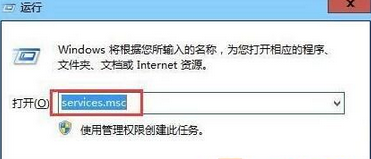
- 按 Win+R 輸入
services.msc 開啟服務管理員。
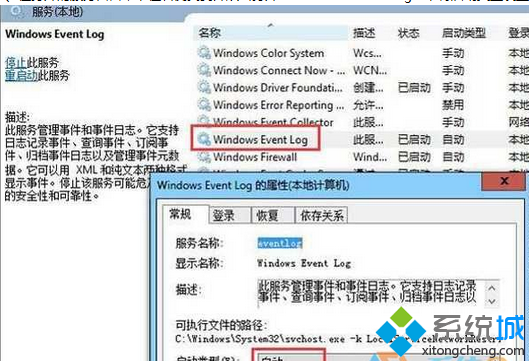
- 在清單中找到 Windows Event Log,雙擊開啟內容頁。
- 將「啟動類型」改為 自動,若服務狀態為「已停止」請點選「啟動」。
- 按「確定」套用,重新執行 Office 安裝程式即可順利完成。
補充檢查
- 同樣確認 Windows Installer 服務亦設為「手動」且可正常啟動。
- 若仍失敗,嘗試以系統管理員身分執行安裝程式,或暫時停用防毒軟體。
- Office 2010 已於 2020/10/13 結束支援,建議升級至 Microsoft 365 Apps 或 Office 2021 以獲得安全性更新。