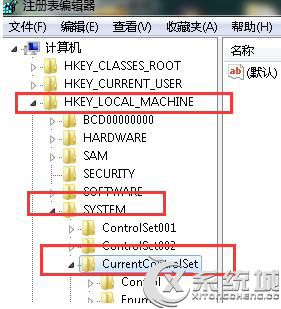
透過登錄編輯器刪除 HKEY_LOCAL_MACHINE\SYSTEM\CurrentControlSet\Services 下的服務鍵值,可永久移除不需的系統服務(謹慎操作,錯刪可能導致系統異常)。
HKEY_LOCAL_MACHINE\SYSTEM\CurrentControlSet\Services
regedit.exe
警告:僅刪除確認無用的第三方服務,切勿刪除系統核心服務,建議操作前備份登錄或建立還原點。
Win7 Excel 無法開啟?控制台修復 Office 安裝元件快速解決
Win7 新增使用者帳號後刪除舊帳號的完整步驟
Windows 7 印表機 Print Spooler 錯誤完整解決方案 (服務依賴與登錄修復)
手繪漫畫怎麼數位化?掃描儀 vs 手機拍照 完整操作指南
Win8/8.1 電腦降級/換裝 Win7?先查驅動、再備份、最後乾淨安裝
Windows 7 隱藏密碼顯示按鈕:群組原則禁用密碼揭露功能
Win7 桌面壁紙切換太快/太慢?修改登錄檔 AnimationDuration 自訂切換動畫時長 (上限 9 秒)
Win7 持續提示檔案損毀?磁碟檢查修復檔案系統錯誤與壞軌、系統還原/重裝終極方案