Windows XP Windows 7 Windows 2003 Windows Vista Windows 綜合教學 Linux 系統教學
Windows 10 Windows 8 Windows 2008 Windows NT Windows Server 電腦軟體教學

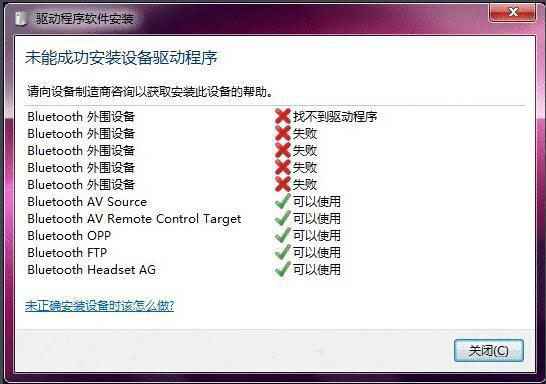
Win7蓝牙驱动安装失败?复制bth.inf到C:\Windows\inf目录重新安装驱动

編輯:Win7 系統應用技巧

Win7 蓝牙设备驱动安装失败/设备管理器黄叹号,常因 bth.inf 系统驱动文件缺失。从驱动存储库复制回 inf 目录即可修复。
修复步骤

  1. 进入 C:\Windows\inf 目录,搜索 bth.inf,若存在则无需操作。
  2. 若不存在,进入驱动存储库:
    C:\Windows\System32\DriverStore\FileRepository\
    搜索类似 bth.inf_amd64_neutral_xxxxxxxx 文件夹。
  3. 进入该文件夹,复制 bth.inf 到 C:\Windows\inf\ 目录。
  4. 设备管理器 → 蓝牙设备右键 → "更新驱动程序" → "浏览计算机查找驱动程序" → 选择 C:\Windows\inf → 完成安装。

原理: .inf 是设备安装信息文件,指导 Windows 匹配驱动、复制文件、写注册表。系统升级/精简/清理工具可能误删 inf 目录下文件,导致后续硬件安装找不到匹配信息。

Copyright © Windows教程網 All Rights Reserved