Windows XP Windows 7 Windows 2003 Windows Vista Windows 綜合教學 Linux 系統教學
Windows 10 Windows 8 Windows 2008 Windows NT Windows Server 電腦軟體教學

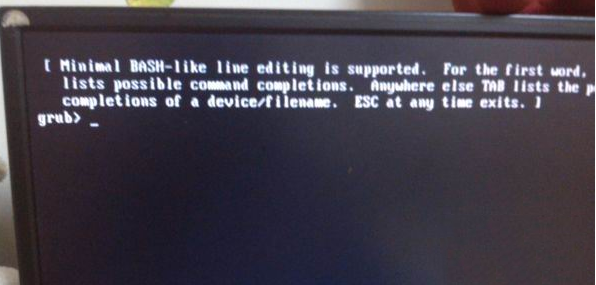
Win7开机出现grub提示无法启动?U盘PE进DiskGenius重建MBR主引导记录修复

編輯:Win7 系統應用技巧

重装 Win7 后开机卡在 grub> 提示符,因 Windows 安装程序重写 MBR 导致原 GRUB 引导残留/损坏。U 盘 PE 进 DiskGenius 重建 MBR 秒修复。
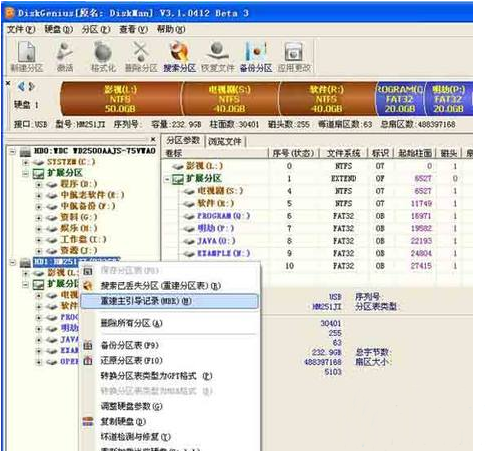
修复步骤

  1. 制作 U 盘 PE 启动盘(微 PE/优启通等),启动进入 PE 桌面。
  2. 打开 DiskGenius(分区工具)。
  3. 右键系统磁盘(通常是 HD0) → "重建主引导记录 (MBR)"。
  4. 确认操作,完成后重启拔 U 盘,正常进入 Win7。

原理

MBR (Master Boot Record) 位于磁盘第 0 扇区,包含分区表和引导代码。Win7 安装会写入标准 MBR 引导代码链接到分区的 VBR (Volume Boot Record) 启动 bootmgr。残留 GRUB 代码会拦截引导流程进入命令行。重建 MBR 覆盖 GRUB 残留代码,恢复 Windows 标准引导链。

预防: 双系统建议先装 Win7 再装 Linux(GRUB 会检测并添加 Windows 启动项),或用 EasyBCD 在 Windows 下管理多系统引导。

Copyright © Windows教程網 All Rights Reserved