共用電腦環境下,為防止他人誤用系統還原,可透過群組原則停用「允許將系統還原到預設狀態」選項。
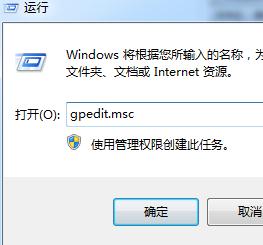
1. 按 Win + R 輸入 gpedit.msc 開啟群組原則編輯器。
gpedit.msc
2. 依序展開:電腦設定 → 系統管理範本 → 系統 → 系統還原
3. 雙擊「允許將系統還原到預設狀態」,選擇「已停用」,確定儲存。
需要使用時再改回「未設定」即可重新啟用系統還原功能。
Win7 登錄編輯器打不開?群組原則解除封鎖與病毒排查
Windows 7 Shell 命令大全:快速開啟系統資料夾、控制台項目與特殊功能
Win7 任務管理器開啟方法完整指南(新手必看)
Win7 任務管理員「凍結」畫面技巧 (Ctrl 鍵鎖定即時資料)
Windows 7 藍屏錯誤代碼大全與排除指南 (含 STOP 碼解析、常見原因、處理流程)
Win7 螢幕解析度調整教學:NVIDIA 控制台 + 系統設定雙管道
Win7 工作列圖示新增與移除:釘選到工作列、解除釘選完整操作指南
Windows 7 藍畫面 (BSOD) 發生後的處理流程與 DMP 分析