工具介紹
Drive Icon Changer:免安裝、英文介面但操作極簡,支援任意磁碟機圖示替換與一鍵還原系統預設。
操作流程
- 執行程式 → 主介面顯示所有磁碟機代號。
- 選中目標磁碟 → 點擊 Install → 選擇
.ico 圖示檔 → 確定,即時生效。
- 需還原:選中磁碟 → 點擊 Uninstall → 瞬間恢復系統預設圖示。
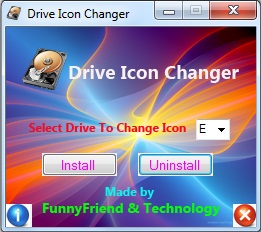
圖 1:主介面與操作示意
優勢
- 免修改註冊表、免重啟 explorer。
- 支援網路磁碟、虛擬光碟機等非常規裝置。
- 綠色免安裝,攜帶方便。
進階技巧
自製圖示:線上轉換工具 (如 ConvertIO) 將 PNG/JPG 轉 256x256 .ico,建議包含多解析度 (16/32/48/256) 以適應不同 DPI。