搜尋索引建立後若不再需要,佔用磁碟空間與 CPU 資源,可透過「索引選項」移除索引位置。
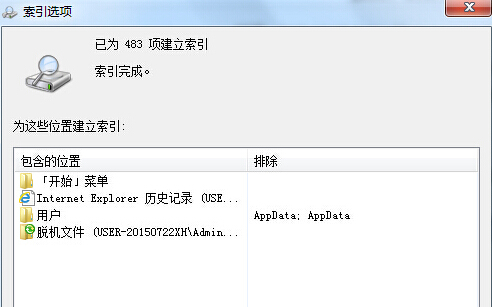
1. 「開始」搜尋框輸入「索引」,點擊「索引選項」。
2. 視窗列出已建立的索引路徑,點擊「修改」。
3. 在「索引位置」對話框取消勾選不需索引的資料夾/磁碟,確定儲存。
系統將停止索引並釋放對應資源。
Win7 系統無法使用網銀與支付寶的註冊表修復方案(重複條目)
Win7 內建網路疑難排解自動檢測修復連線問題?一鍵診斷 Internet 連線故障
Win7 黑畫面死機?離線修補程式法徹底解決「更新後黑屏」
Win7 右下角隱藏圖示區(系統匣)不見了?快速找回教學
Win7 如何取得資料夾絕對路徑?滑鼠點一下地址列即可
解決 Win7 插入 USB 滑鼠/裝置識別緩慢的問題
64 位元 Win7 程式頻繁「已停止運作」 綜合排查與 DEP 設定解決方案
筆電待機喚醒後無聲音?聲卡驅動不支援 Win7 電源管理,臨時點擊喇叭測試可恢復