Windows XP Windows 7 Windows 2003 Windows Vista Windows 綜合教學 Linux 系統教學
Windows 10 Windows 8 Windows 2008 Windows NT Windows Server 電腦軟體教學

Win10 系統圖標提取教程:軟媒魔方圖標大師導出 imageres.dll 全套圖標包下載

編輯:Win10 系統基礎知識

Win10 Build 10125 (近 RTM 版) 圖標設計大幅優化,若想提取套用至舊系統/自訂主題,可用軟媒魔方「圖標大師」一鍵導出:
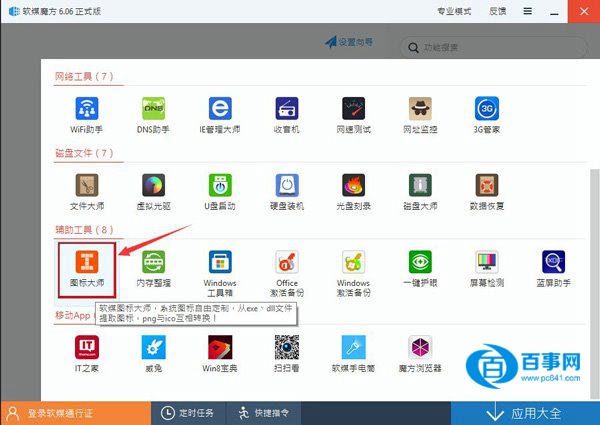
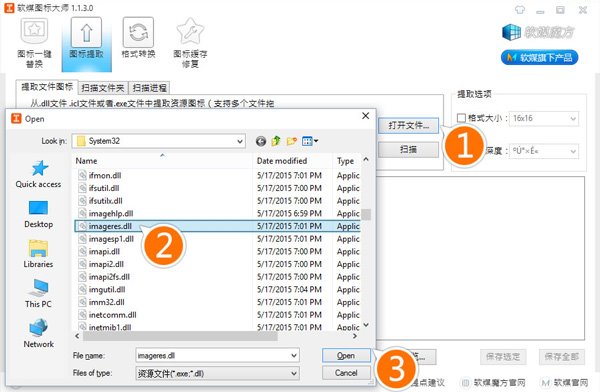
提取步驟

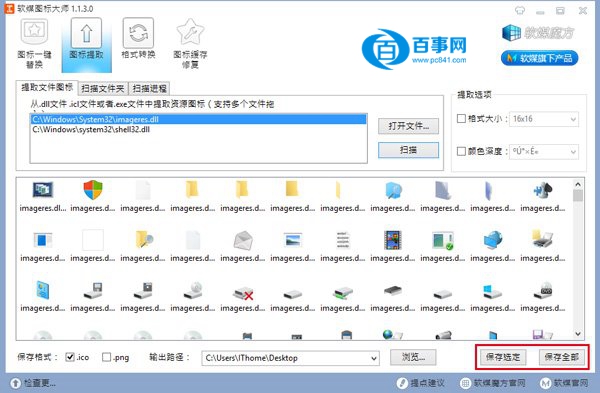
  1. 安裝軟媒魔方 →「工具箱」→「圖標大師」→「圖標提取」。

  2. 「開啟檔案」→ 選擇 `C:\Windows\System32\imageres.dll` → 開啟。

  3. 列表顯示所有系統圖標 → 勾選所需 →「儲存選定」或「儲存全部」(ICO 格式)。

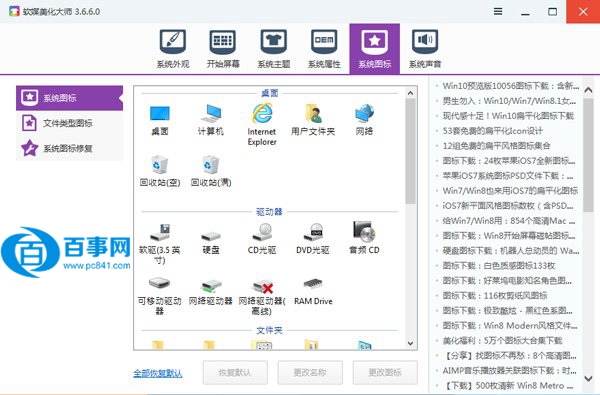
  4. 「個人化」→「桌面圖示設定」/ 軟媒魔方「美化大師」替換目標圖標。

現成圖標包下載

百度網盤:https://pan.baidu.com/s/1sj6xEPn
含全套 ICO 格式圖標 + 64 位 `imageres.dll`,直接替換或自行提取。

💡 進階:Resource Hacker / 7-Zip 亦可直接打開 `imageres.dll` / `shell32.dll` / `ddores.dll` 提取圖標資源 (PNG/ICO/BMP),無需第三方工具。

Copyright © Windows教程網 All Rights Reserved