Modern 應用(UWP)偶發閃退、無回應、無法載入等問題,重設為出廠狀態通常能解決。Windows 10 提供 PowerShell 指令批次修復所有應用。
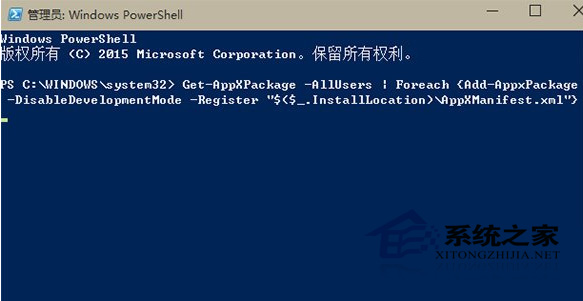
PowerShell → 右鍵選擇「以系統管理員身分執行」。Get-AppXPackage -AllUsers | Foreach {Add-AppxPackage -DisableDevelopmentMode -Register "$($_.InstallLocation)\AppXManifest.xml"}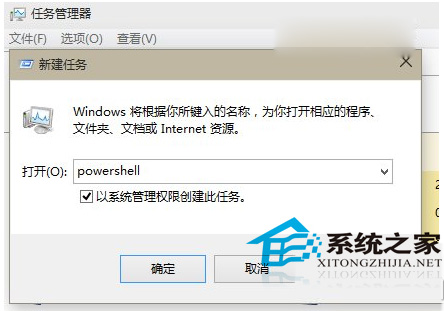
注意:重設會清除應用本地資料(登入狀態、偏好設定等),但不影響系統檔案。若應用核心檔案損毀,重設無效,需改用「修復」或重新安裝。Windows 10 本身也支援「重設這台電腦」功能,可保留個人檔案重裝系統。
Win10 應用程式啟動錯誤 0xc0000018 解決方案:修改註冊表與安全模式排查
使用大白菜 USB 開機製作工具建立 Windows 10 安裝隨身碟教學
Win10 檔案總管「共用」按鈕:一鍵呼叫 Charms 分享介面
Win10 快速啟動列不見了?五步驟找回經典 Quick Launch 工具列
Win10 開啟「網路與共用中心」三大法:工作列網路圖示、桌面網路圖示、開始搜尋
Win10 右鍵選單新增「加密」選項(註冊表 EncryptionContextMenu)
Win10 預覽版使用技巧大全:關閉同步、啟用 Cortana、加快更新、試用新版 Office/音樂/視訊 App 十大攻略