Windows XP Windows 7 Windows 2003 Windows Vista Windows 綜合教學 Linux 系統教學
Windows 10 Windows 8 Windows 2008 Windows NT Windows Server 電腦軟體教學

Win10 應用商店無法安裝應用?wsreset 清除快取一鍵修復

編輯:Win10 系統應用技巧

Microsoft Store 下載應用程式卡住、報錯、無法安裝,多半是本地快取損壞。執行 wsreset.exe 可重置 Store 快取並自動重啟 Store,解決 90% 以上異常。

操作方法

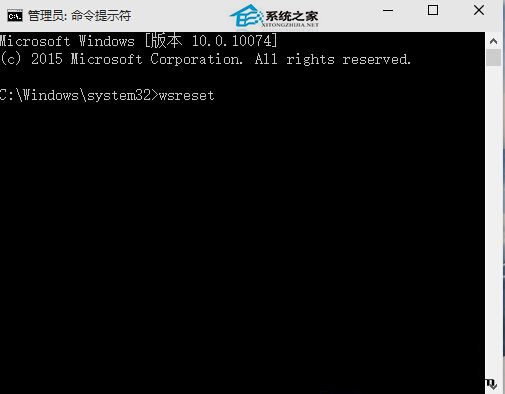
  1. Win+R → 輸入 wsreset → Enter。
  2. 或管理員 CMD/PowerShell 執行 wsreset.exe。
  3. 出現空白 CMD 視窗約 10-30 秒後自動關閉,Store 重新開啟即修復完成。
執行 wsreset 命令示意圖

進階修復 (若 wsreset 無效)

  1. 設定 → 應用程式 → 安裝的應用程式 → 找「Microsoft Store」→ 「進階選項」→ 「修復」/「重設」。
  2. PowerShell 重新註冊:
    Get-AppxPackage Microsoft.WindowsStore | Foreach {Add-AppxPackage -DisableDevelopmentMode -Register "$($_.InstallLocation)\AppXManifest.xml"}
  3. 檢查日期/時間/地區設定正確,網路連線正常。

wsreset 為官方內建重置工具,零風險、無需下載、秒級完成,遇到 Store 問題請優先嘗試。

Copyright © Windows教程網 All Rights Reserved