Windows XP Windows 7 Windows 2003 Windows Vista Windows 綜合教學 Linux 系統教學
Windows 10 Windows 8 Windows 2008 Windows NT Windows Server 電腦軟體教學

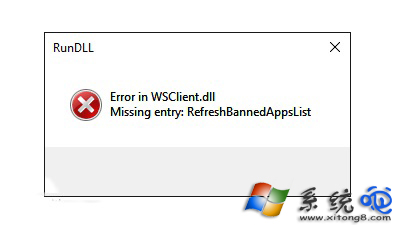
Win10 彈出 Error in WSClient.dll 錯誤?工作排程器停用 WSRefreshBannedAppsListTask 任務修復

編輯:Windows 10 系統介紹

升級 Win10 後開機/操作中反覆彈出 「Error in WSClient.dll missing entry: RefreshBannedAppsList」**,源於工作排程器內 WSRefreshBannedAppsListTask 任務嘗試呼叫已移除/損壞的 WSClient.dll 匯出函數。停用該任務即可消除錯誤彈窗。

修復步驟

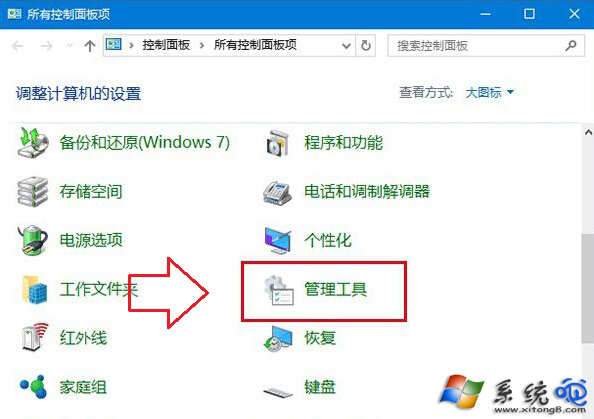
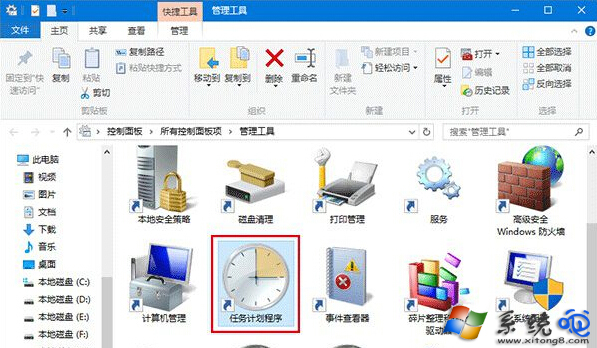
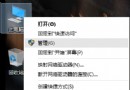
  1. 開始按鈕右鍵 → 「控制台」 → 檢視模式「大圖示」 → 「管理工具」 → 雙擊 「工作排程器」。
  2. 左側樹狀展開:
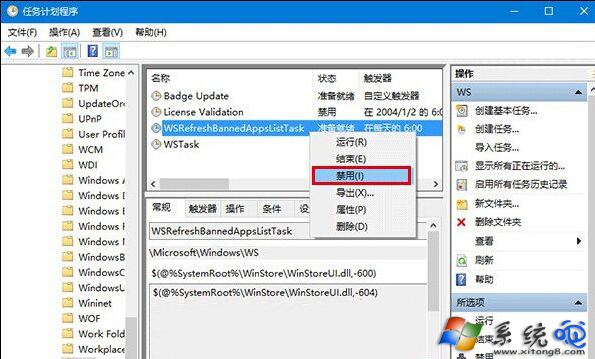
    工作排程器程式庫 (本機) → Microsoft → Windows → WS
  3. 3. 中央列表找到 WSRefreshBannedAppsListTask → 右鍵 → 「停用」。 4. 關閉工作排程器,錯誤彈窗即刻停止。

WSClient.dll 錯誤視窗

控制台管理工具

工作排程器主視窗

WS 節點下的任務列表

背景說明

  • WSClient.dll 屬於 Windows Store / 應用程式授權相關元件,早期版本 (1507/1511) 含 RefreshBannedAppsList 匯出函數,後續版本移除/重構導致呼叫失敗。
  • 該排程任務原用於定期重新整理「已禁止應用程式清單」,現已無實質功能,停用無副作用。
  • 若後續功能更新恢復相關功能,任務會自動重新啟用/重建,屆時若再報錯再次停用即可。

命令列快速停用 (管理員)

schtasks /Change /TN "\Microsoft\Windows\WS\WSRefreshBannedAppsListTask" /Disable

在工作排程器中停用 WSRefreshBannedAppsListTask,即可徹底解決 Win10 反覆彈出 WSClient.dll 缺失入口點錯誤。

Copyright © Windows教程網 All Rights Reserved