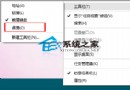
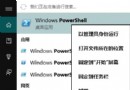
Win8 為優先進入開始畫面引入啟動延遲,Win10 回歸桌面優先,禁用延遲可加快桌面載入,尤其啟動項多時效果明顯。
regedit。HKEY_CURRENT_USER\Software\Microsoft\Windows\CurrentVersion\Explorer。Serialize。StartupDelayInMSec,數值設 0 (十六進位)。
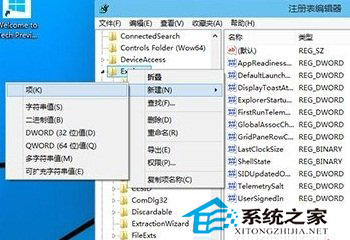
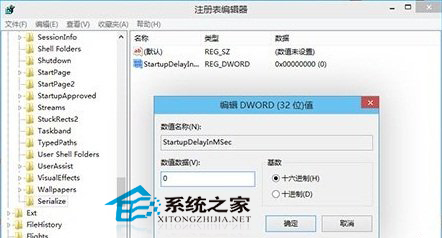
完成後開機啟動項載入速度提升,體感更順暢。
Windows 10 家用版升級專業版/企業版完整教學:輸入通用金鑰 (GVLK) 線上升級保留資料與應用
Win10 如何將語音轉換為文字?訊飛語音輸入法電腦版支援語音輸入、即時轉寫,免費好用
Win10 紅石版 Build 14295 更新內容:修復遊戲手柄凍結、大寫鎖定刷新、Xbox App 登入等問題
Win10 取得 C 槽資料夾寫入權限:進階安全性設定取得擁有權、授權完全控制
Win10 系統共享打印機設置圖文教程:六步輕松實現局域網打印
Win10 寬帶撥號錯誤 691 八大成因與對策:帳密、欠費、MAC 綁定全覆蓋