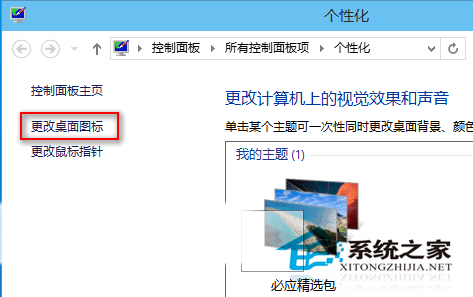
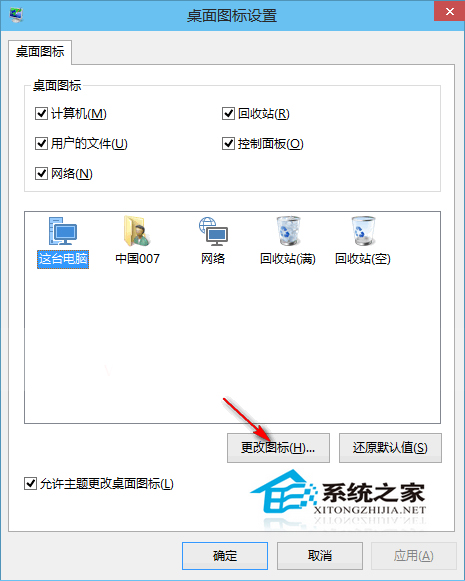
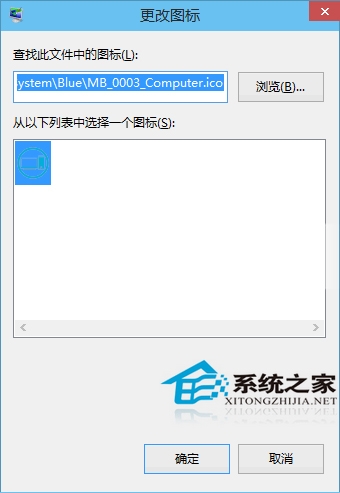
Windows 10 預設桌面圖示風格與 Windows 7/8 差異較大,且僅顯示「回收站」。習慣經典風格的用戶可自行下載 Windows 7/8 系統圖示檔(.ico),透過「個人化」設定逐一替換。
小結:微軟在 UI 設計上投入許多心思,但用戶習慣勢力龐大。替換圖示為 .ico 格式,無需第三方工具,安全且可隨時還原,是適應新系統的過渡好方法。
Win10 關閉網路探索隱藏區域網路裝置
Win10 解決「USB 連接埠電源浪湧」提示:關閉通知設定與硬體端排查指南
Win10 啟用「檔案歷程記錄」自動備份個人檔案完整教學
Windows 10 禁止行動裝置自動播放:群組原則設定教學
Windows 10 家用版升級專業版官方管道:Microsoft Store 購買授權步驟
Win10 TH2 更新緩慢/卡頓/失敗?重置 Windows Update 服務與快取 (同 22558)
Windows 10 關閉 Cortana (小娜) 語音助手教學:隱私設定中停用語音/輸入/手寫資料收集
Windows 10 自訂開始選單項目:將控制台、裝置、網路、系統管理工具等常用功能釘選到開始列表