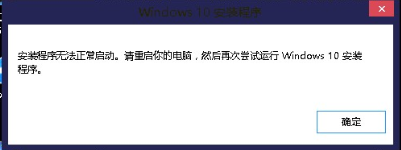
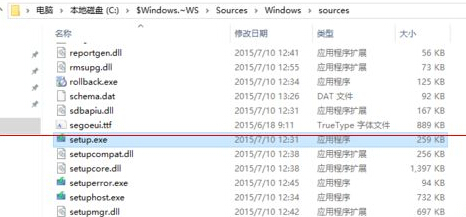
升級下載檔案實際保存在隱藏資料夾 C:\$Windows.~WS\Sources\Windows\Sources\ 中。若升級助手失敗,可嘗試直接執行其中的 setup.exe 繼續安裝。
C:\$Windows.~WS\Sources\Windows\Sources\
setup.exe
$Windows.~WS
Sources
Windows
參考另一篇「Win10 正式版安裝後很多安裝程式無法正常啟動該怎麼辦?」嘗試其他方案(如媒體建立工具、清理軟體發佈服務快取等)。
Windows 10 Mobile Build 10080 因 Bug 取消大規模推送:Slow Ring 用戶跳過等待下一版本
Win10 如何把 IE 瀏覽器圖示放到桌面?建立捷徑完整教學
Win10 透過登錄檔鎖定 IE 首頁防止被修改
Win10 ICS 服務啟動後自動停止導致網路斷線?三大解決方案修復網際網路連線共享
Win10 電腦莫名自動重開機?關閉「系統失敗自動重新啟動」一勞永逸
Win10 Edge 瀏覽器開啟深色模式(夜間模式)保護眼睛,三步驟完成設定
Windows 10 關閉家庭群組:同 ID 23311/23351 內容重複
Win10 自動修復失敗怎麼辦?進入進階選項使用系統還原點回滾恢復