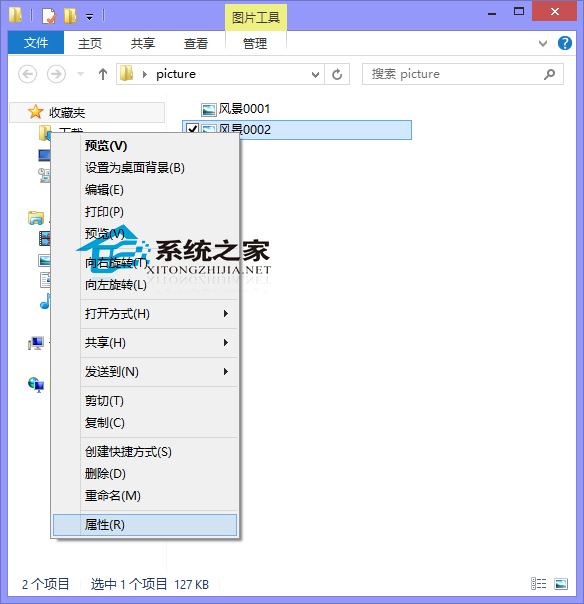
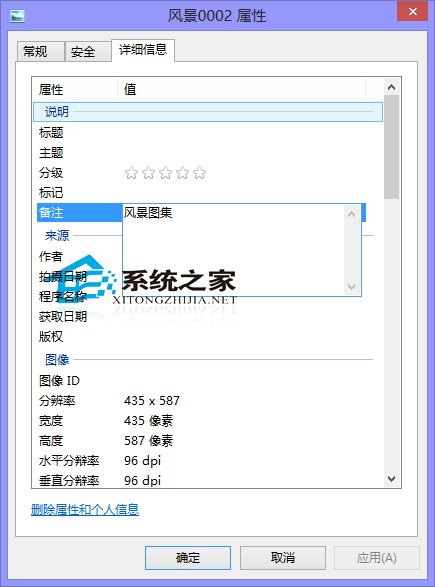
整理大量照片需加備註方便搜尋?Win10 檔案屬性內建「備註」欄位,直接編輯即可,無需第三方軟體。
此欄位支援中文、標點、換行,配合檔案總管搜尋框輸入關鍵字即可快速篩選。若習慣用「Windows 相片檢視器」看圖,可參考「Win10 如何設定照片檢視器為預設看圖工具」切換預設程式。
Win10 任務列「搜尋 Web 和 Windows」怎麼隱藏或縮小?圖文教學
Win10 安裝 Visual DSP++ 3.5 後無法輸入序列號?教你一招找回「New」按鈕
Win10 為 USB 隨身碟新增寫入保護?安全性設定拒絕寫入權限(同 ID 93108)
Win10 Edge 瀏覽器下載清單在哪裡?Ctrl+J 快速鍵或中樞按鈕開啟
Windows 10 遊戲列錄製失敗「無可錄製內容」解決方案:更新顯示卡驅動與 Windows Defender 全盤掃描
Windows 10 重設此電腦完整教學:保留檔案/全新安裝雙模式詳解
Windows 10 調整虛擬記憶體教學
Win10 命令提示字元設定半透明視窗:隱藏在屬性「色彩」頁籤的不透明度調整