Windows XP Windows 7 Windows 2003 Windows Vista Windows 綜合教學 Linux 系統教學
Windows 10 Windows 8 Windows 2008 Windows NT Windows Server 電腦軟體教學

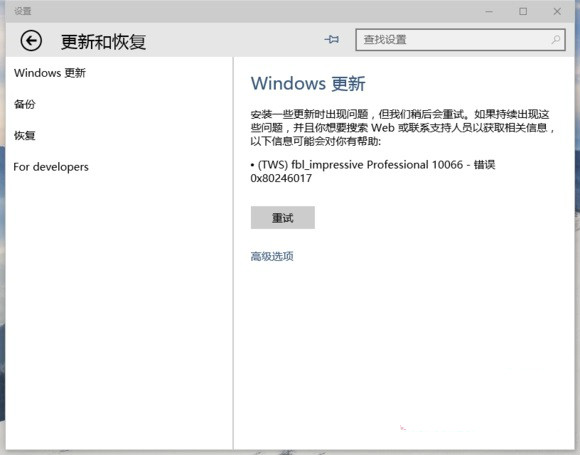
Win10 更新失敗 0x80246017?註冊表修改 SelfHost 參數解決

編輯:Windows 10 系統介紹

Windows 10 Insider 預覽版更新失敗報錯 0x80246017,常因 SelfHost\Applicability 註冊表參數錯誤(分支名稱、風險等級設定不符)。修正相關鍵值即可恢復更新功能。

註冊表修復步驟

  1. Win+R → regedit。
  2. 定位 HKEY_LOCAL_MACHINE\SOFTWARE\Microsoft\Windows\SelfHost\Applicability。
  3. 修改右側鍵值:
    • BranchName → fbl_impressive
    • ThresholdRiskLevel → low
    • 刪除 ThresholdInternal (若存在)
    • 刪除 ThresholdOptedIn (若存在)

更新失敗 0x80246017 錯誤畫面

  1. 重開機或重新啟動 Windows Update 服務 (net stop wuauserv && net start wuauserv) 後再次檢查更新。
適用場景: 此錯誤多見於 Insider 快速/慢速通道切換、手動修改註冊表參數後。正式版用戶極少遇到。若修復無效,建議執行 sfc /scannow 或使用媒體建立工具就地升級修復。
Copyright © Windows教程網 All Rights Reserved