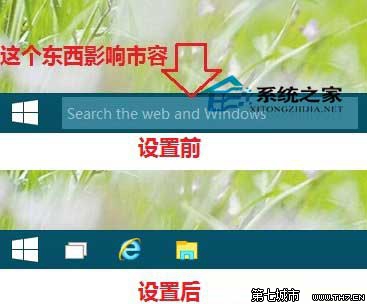
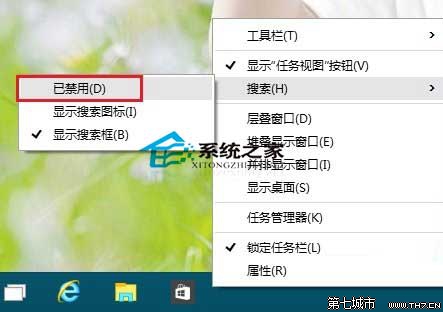
在任務列空白處按一下滑鼠右鍵,從彈出的選單中指向「搜尋」,再在次級選單中點選「已停用」。
完成後,任務列上的搜尋方塊即會隱藏,介面更加簡潔。
電腦管家 Win10 升級檢測 CPU 不支援解決方案
Windows 10 技術預覽版完整安裝教學:升級、雙系統、USB 安裝三大法
Win10 取得最高系統管理員權限:註冊表 FilterAdministratorToken=1 解決開始選單無法使用等問題
Windows 10 自訂開始選單項目:將控制台、裝置、網路、系統管理工具等常用功能釘選到開始列表
Win10 更新 KB3097617 安裝失敗怎麼辦?關閉殺毒軟體或手動離線安裝
白雲一鍵重裝系統 Win10 圖文教學:全自動無人值守安裝
Windows 10 Windows Defender 無法啟動?一鍵指令修復服務
Win10 修改 Microsoft Store 應用程式/遊戲預設安裝位置:釋放 C 盤空間