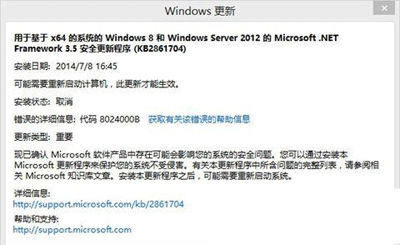
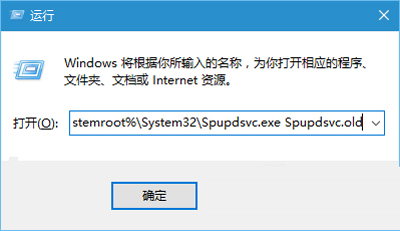
此錯誤通常因更新服務元件損壞導致,可透過重新註冊 Spupdsvc.exe 來修復。
Spupdsvc.exe
Cmd /c ren %systemroot%\System32\Spupdsvc.exe Spupdsvc.old
此法可解決多數 8024000B 錯誤;若無效,可嘗試重置 Windows Update 元件或使用 DISM/SFC 修復系統檔案。
Win10 筆電麥克風沒聲音?三步驟完整排除教學
用電腦瀏覽 Win10 手機系統盤 (C:) 技巧:建立捷徑複製法
Win10 命令提示字元用 for /r 快速遞迴搜尋檔案,比總管搜尋更快
Windows 10 好用嗎?主要亮點與改進全面評析
Win10 安裝第三方字型後 Edge 網頁亂碼:群組原則設定 IE 使用者代理字串為 MSIE 9.0 修復
Windows 10 設定自動關閉螢幕時間教學
Win10 快速鍵大全:Win 鍵組合、虛擬桌面、視窗管理、截圖、游戲錄製、Cortana 一表掌握
Win10 「系統中斷」CPU 佔用 100% 完整排查指南:驅動、硬體、BIOS 逐層解決