Windows XP Windows 7 Windows 2003 Windows Vista Windows 綜合教學 Linux 系統教學
Windows 10 Windows 8 Windows 2008 Windows NT Windows Server 電腦軟體教學

Win10 正式版啟用暗黑主題:自建 .theme 檔案導入實現系統級深色介面

編輯:Windows 10 系統介紹

Windows 10 正式版隱藏深色主題,可透過自建 .theme 檔案啟用,視覺比純黑更柔和:

建立主題檔案

  1. 新建文字文件,貼入完整主題定義程式碼(包含 [Theme]、[Control Panel\Desktop]、[VisualStyles]、[MasterThemeSelector]、[Control Panel\Colors] 區段,色彩值為 RGB 45,45,45 等深灰系)。
  2. 另存為 AllDarkEveV2.theme,編碼選 Unicode,類型「所有檔案」。
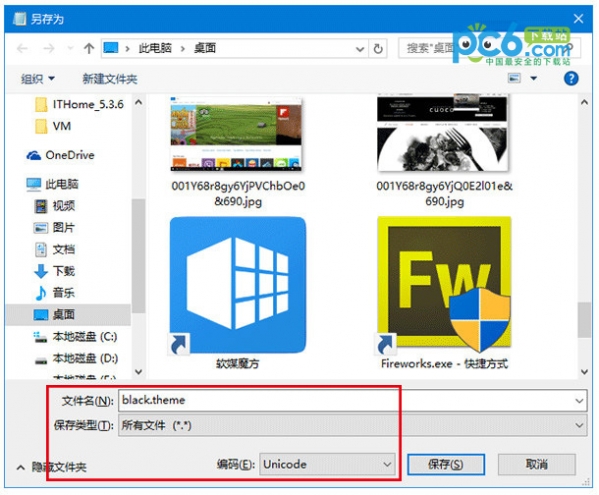
    另存為 theme 檔案 Unicode 編碼
  3. 放入路徑:
    C:\Users\您的帳戶\AppData\Local\Microsoft\Windows\Themes\
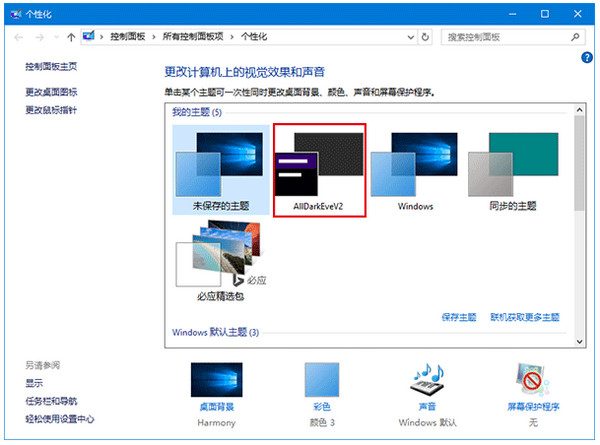
  4. 雙擊執行套用,或在「設定」→「個人化」→「主題」→「主題設定」中選擇 AllDarkEveV2。
    主題設定選擇 AllDarkEveV2

注意: 套用過程可能卡在「請稍候」,按 Ctrl+Alt+Del →「鎖定」→ 解鎖即可恢復。正式版建議改用「設定」→「個人化」→「顏色」→「選擇預設應用程式模式:深色」官方開關。

Copyright © Windows教程網 All Rights Reserved