Modern 應用預設安裝在系統碟,長期使用易擠佔空間。Win10 內建「移動」功能可遷移至資料碟。
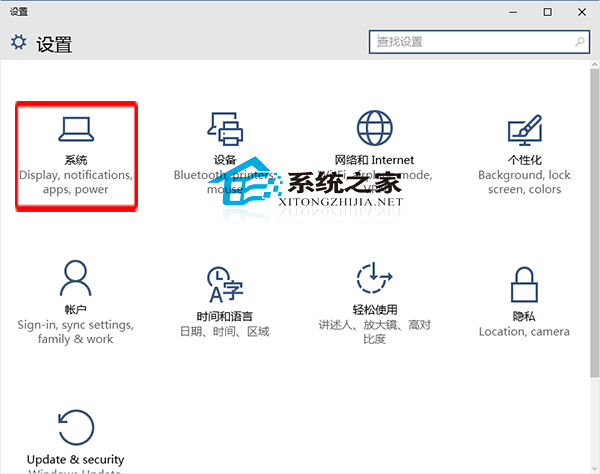
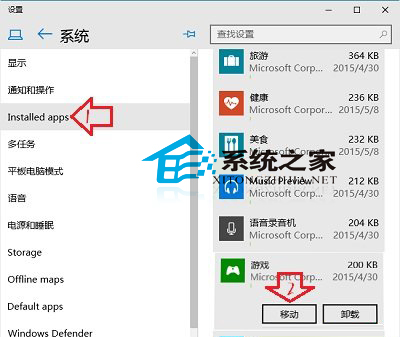
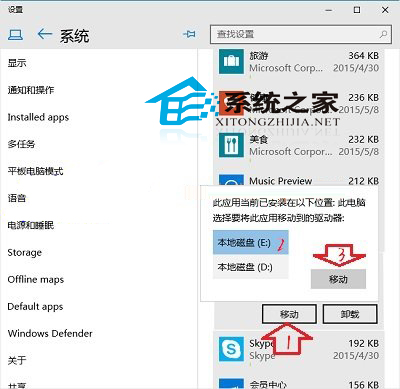
同樣可遷移使用者資料夾(文件、圖片、下載等),組合使用可大幅紓解 C 槽壓力。
Win10 開機記憶體佔用過高?匯入登錄檔關閉 TimeBroker 與 SysMain
Win10 滑鼠滾輪失靈?開啟「懸停非作用中視窗捲動」或檢查硬體
Windows 10 開機出現「同步處理主機 Session」佔用資源?登錄修改徹底停用同步服務
Win10 10547 升級後 Excel 無法關閉?停用硬體圖形加速解決
VMware Workstation 10 安裝 Win10 虛擬機完整教程:ISO 掛載/客戶機選 Win8/64 位對應
Win10 紅石版 Build 14291 推送:Edge 支援擴充功能、固定分頁、地圖與鬧鐘更新